- Your primary category, real business name, accurate hours and a steady flow of reviews move Maps rankings more than anything else.
- Tick every predefined service Google suggests. It's the most underrated fix on most profiles.
- Description keywords, posting frequency and geotagged photos barely affect rankings.
- Avoid suspension: no keyword stuffing, no fake hours, no AI-generated photos, realistic service areas.
- Measure with a GeoGrid scan before and after every change, not a single ranking from your office.
Most Google Business Profile guides give you a checklist of 20 things and treat them as equally important. They aren't. Some changes can move you several positions in the map pack within weeks. Others, like geotagging photos or stuffing keywords into your description, do close to nothing.
This guide is built differently. I've spent 4+ years doing nothing but local SEO, optimizing 200+ Google Business Profiles for service businesses and clinics across five continents. Every step is ranked by likely impact, based on:
- Whitespark's 2026 Local Search Ranking Factors survey
- Google's own guidelines
- Profiles I've audited or taken over from other providers
Where I'm sharing my own observation rather than published data, I say so.
If you just want the quick version, start with my Google Business Profile checklist.
How Google ranks businesses on Maps
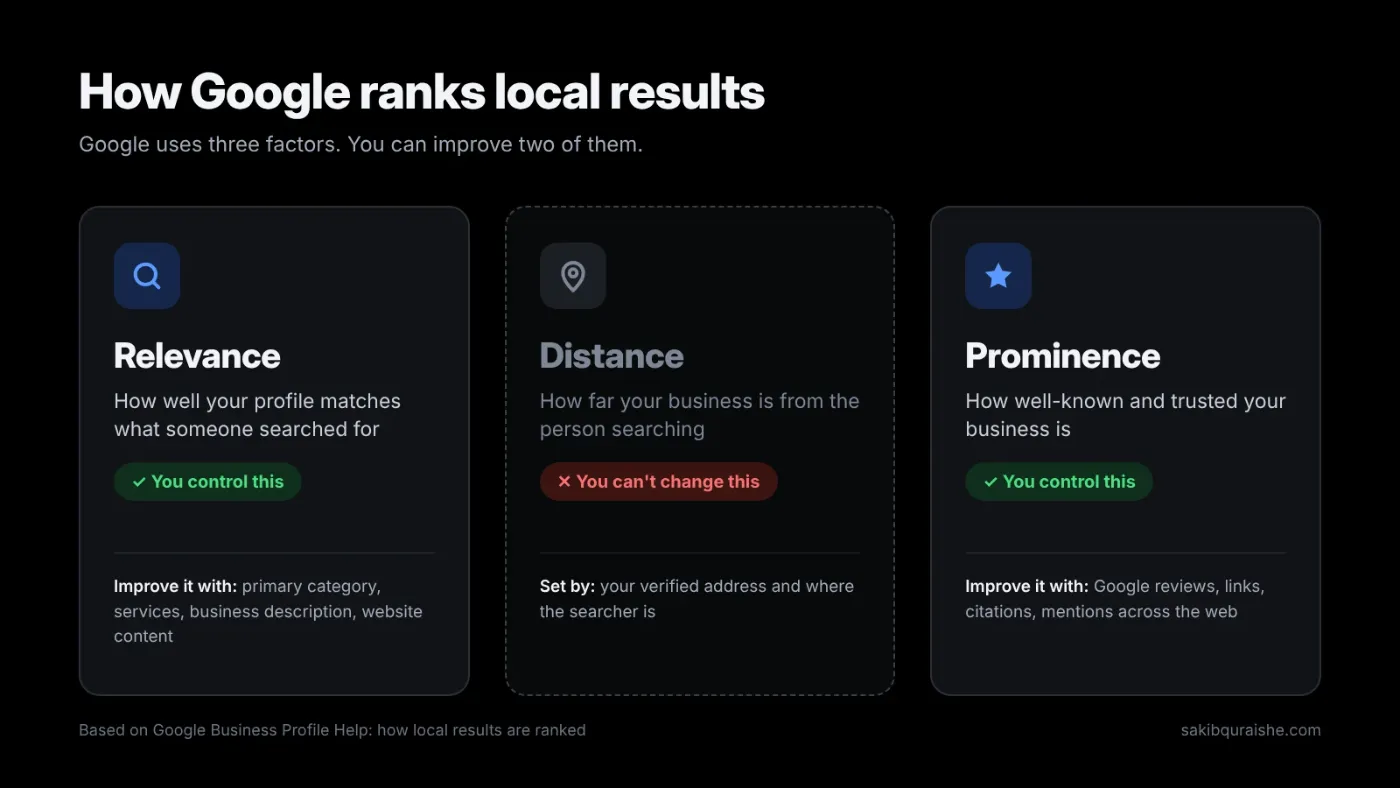
Google says local results are ranked mainly on three things: relevance, distance and prominence.
- Relevance: how well your profile matches the search. Your categories, services and business info drive this.
- Distance: how far you are from the searcher, or from the location in their query.
- Prominence: how well known you are. Google names links, articles, directories, review count and review score as inputs.
Google also states plainly that you cannot pay for a better local ranking. That matters, because it means every ranking gain comes from work on these three areas.
Here's the part most guides skip: you can't change distance. Your address is your address. What you can do is push relevance and prominence so hard that you rank further from your office. That's what map optimization really is.
Your profile is one part of a bigger picture. For the full overview, see what local SEO is and how it works.
The priority list: what moves rankings most
What moves rankings most is your primary category, your distance from the searcher, your business name, your opening hours and your reviews. Here are the GBP-related factors that ranked highest for local pack and Maps rankings in Whitespark's 2026 survey, and what I do about each.
| Rank (of 187) | Factor | What to do |
|---|---|---|
| 1 | Primary GBP category | Pick the most specific category your competitors rank with |
| 2 | Proximity to the searcher | Can't change; build relevance and prominence instead |
| 3 | Keywords in business name | Use your real name only; report competitors who stuff theirs |
| 5 | Business open at time of search | Set accurate hours; extend real hours if you can |
| 6 | High Google rating (4–5) | Run a steady review system |
| 8 | Additional categories | Add every category that truly fits |
| 9 | Number of Google reviews with text | Ask every happy customer |
| 10 | Correct map pin placement | Check the pin sits on your building |
| 11 | Review recency | Never let reviews stall for months |
| 16 | Profile completeness | Fill every relevant field |
| 22 | Predefined services | Tick every Google-suggested service you offer |
And a few factors that sit near the bottom, despite what you may have heard: keywords in your GBP description (#171), frequency of Google posts (#148) and geotagged photos (#187, dead last).
Step 1: Claim, verify and set up correctly
If your profile isn't verified, nothing else in this guide matters much. Claim it in Google Business Profile Manager, complete verification, and get the basics right from day one:
- One profile per business. Google's guidelines say duplicates cause display problems. Here's how to find and merge duplicate listings.
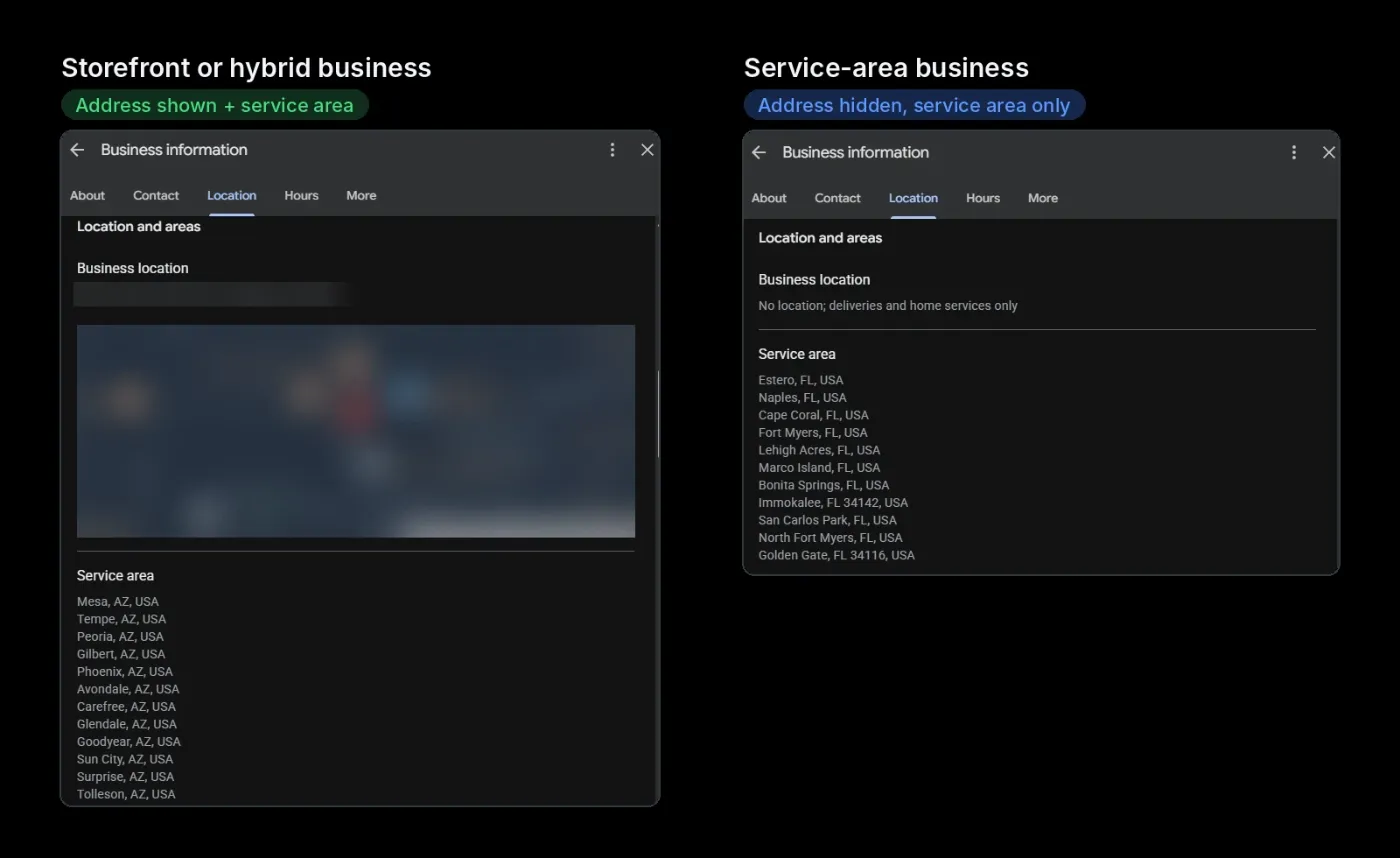
- Storefront or service-area business (SAB). If customers come to you, show your address. If you travel to customers and don't serve them at your location, hide the address and set service areas. More in service-area business vs storefront.
- Signage. Google expects businesses that show an address to have permanent signage there.
- Realistic service areas. Whitespark's experts flag service areas larger than about two hours' drive as a suspension risk.
- Ownership. Keep primary ownership on an account the business controls. Give agencies manager access, not ownership. I've seen owners lose their own profile because a former agency held primary ownership.
Step 2: Choose your primary category like your rankings depend on it
They do. The primary category was the #1 factor in Whitespark's 2026 survey, and it decides which searches you're even eligible for. It's also one of the most common problems I find in audits: the profile sits in a broad or wrong primary category, and the owner has no idea it's holding them back.
How I pick it:
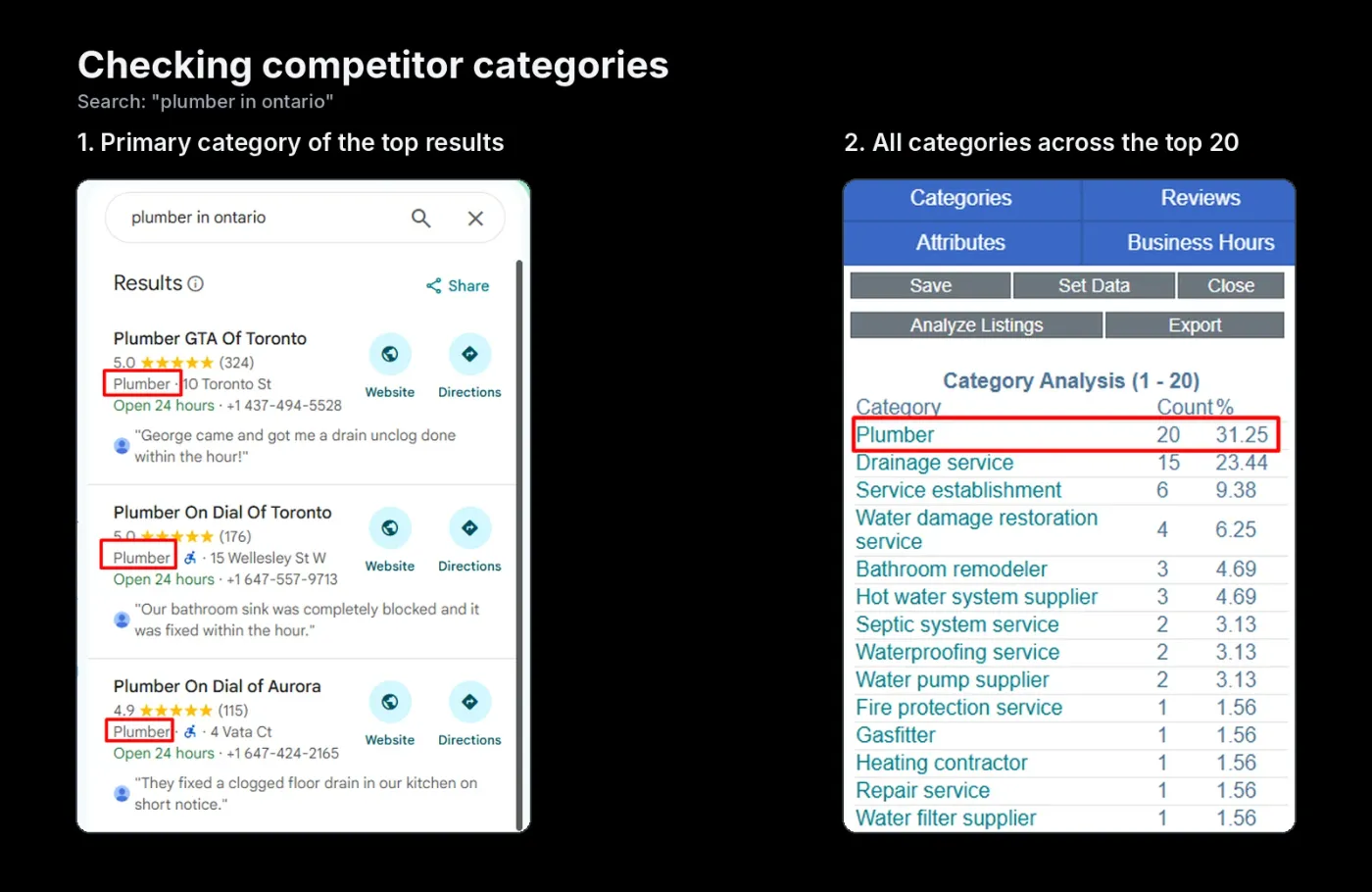
- Search your main keyword ("roof repair Phoenix") and note the top 10 map results.
- Check their primary categories with a free extension like GMB Everywhere or PlePer.
- Choose the most specific category that matches your core revenue service. "Roofing contractor" beats "Contractor".
- Add secondary categories for other real services. You can add up to nine. My guide to choosing GBP categories goes deeper.
Two warnings. Changing your primary category can trigger re-verification, so make the change deliberately. And only add categories you truly serve: irrelevant categories dilute relevance and invite edits.
Step 3: Fill in services, starting with Google's predefined ones
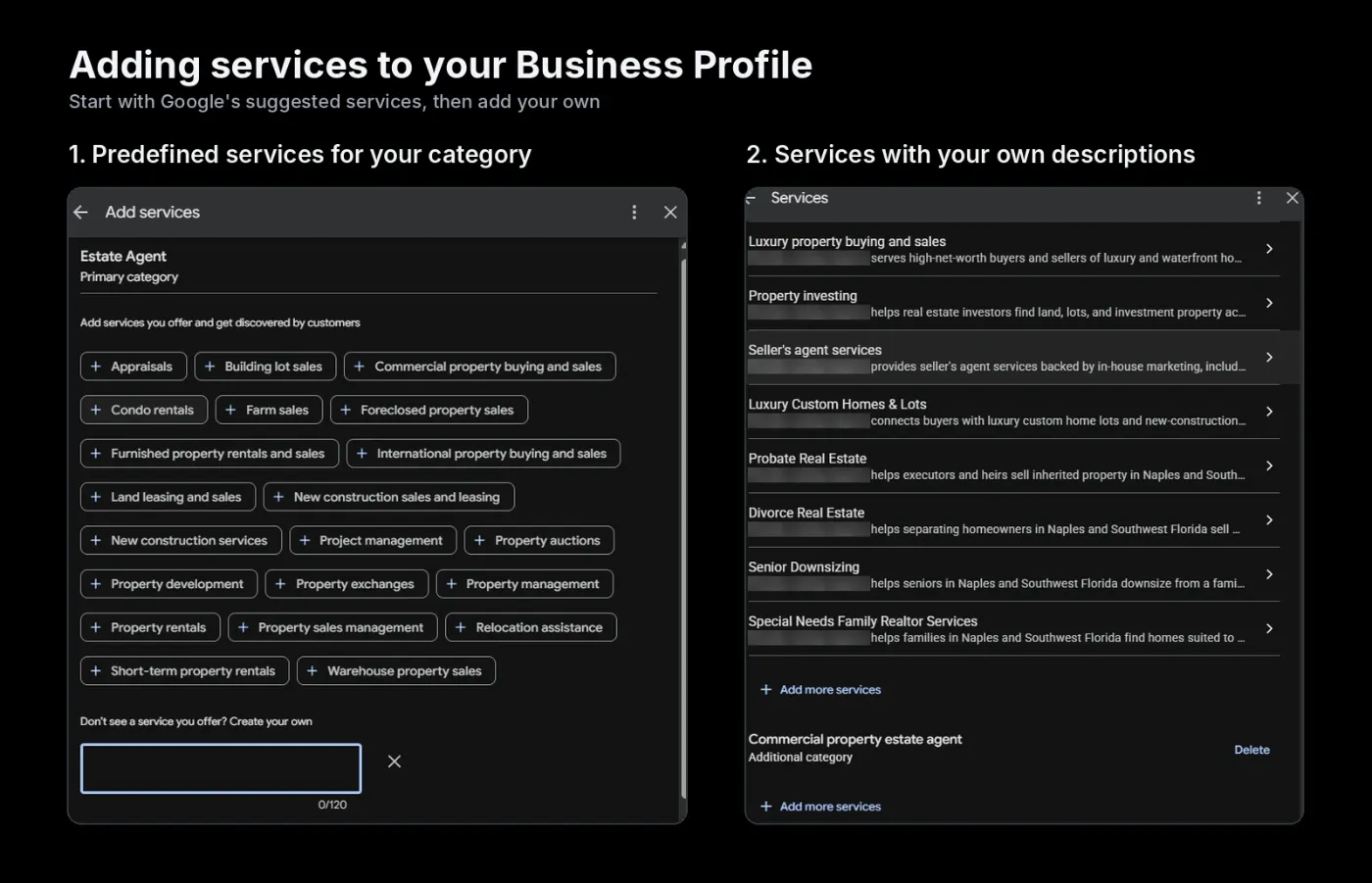
This is the most underrated fix on most profiles I audit. In 2023, services were near the bottom of expert rankings. Then Joy Hawkins at Sterling Sky published research showing Google's predefined services affect rankings, and Whitespark's Darren Shaw confirmed it in his own tests. In 2026, predefined services ranked #22 and keywords in services jumped 75 places.
What to do:
- Tick every predefined service Google suggests for each of your categories, if you offer it.
- Add custom services for anything missing, using the words customers search ("emergency roof leak repair", not "Rapid Response Solutions").
- Write a short, plain description for each service. Keep it factual.
Step 4: Set hours that keep you visible
"Business is open at the time of search" entered the survey for the first time and landed at #5. Whitespark describes watching rankings drop as closing time approaches and recover when the business opens. Proper hours also climbed from #85 to #21.
What this means for you:
- Make sure hours are accurate and set special hours for holidays.
- If you genuinely take calls or appointments longer, list those real hours.
- Do not fake 24/7 hours at a location customers visit. Whitespark is clear that this breaks Google's guidelines and leads to angry reviews when people show up to a locked door.
Step 5: Use your real business name (and why it matters for spam)
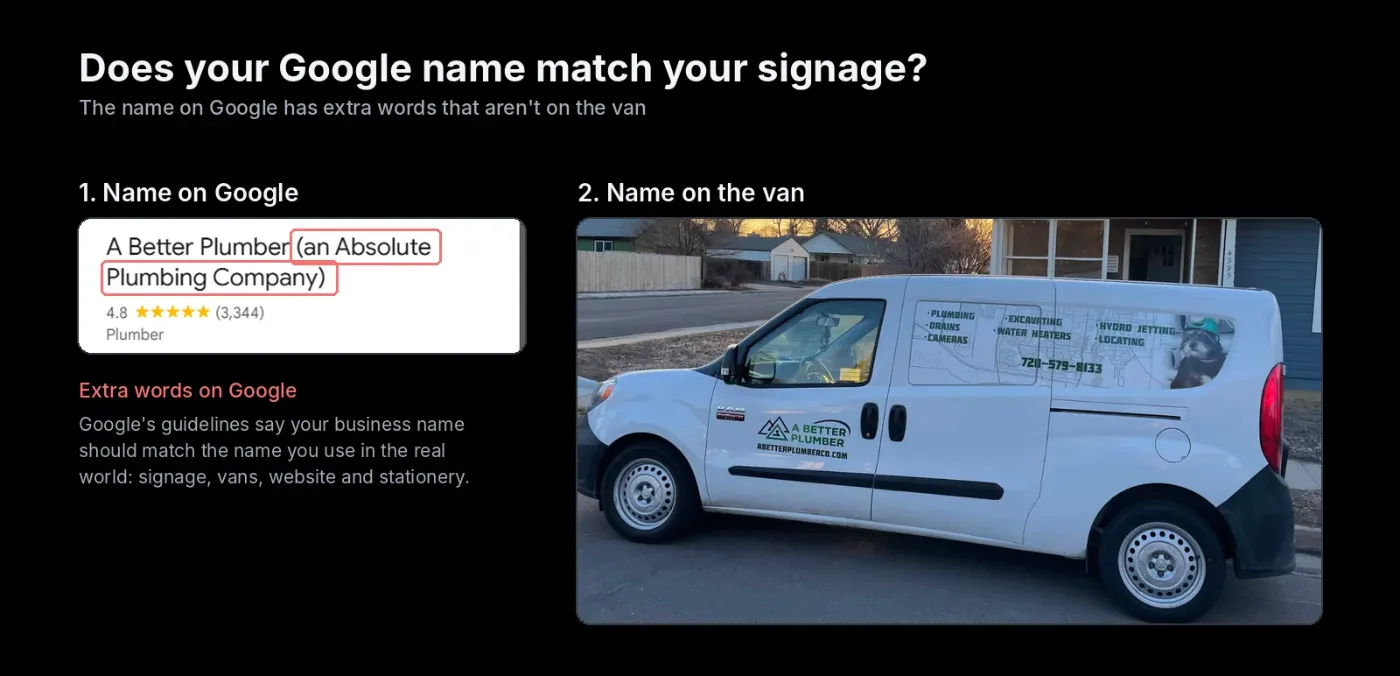
Keywords in the business name ranked #3. That's exactly why so many profiles stuff them in, and exactly why you shouldn't. Google requires your name to match your real-world name as shown on signage and branding. Adding "Best Plumber Dallas" to your name is a fast route to a suspension or a forced edit. I break down the trade-off in keyword stuffing in business names.
The legitimate play has two parts:
- If your legal or signage name genuinely includes a service word ("Oak Creek Roofing Co."), use it in full.
- Report competitors who stuff their names. More on that in the spam section below.
Step 6: Write a description for customers, not the algorithm
Your description gets up to 750 characters. Keywords in it scored only #171 for rankings, so don't obsess. Use it to convert the person reading:
- First sentence: what you do, for whom, where. ("Family-owned roofing contractor serving Columbia and Lancaster County, PA since 2008.")
- Then your core services, what makes you different, and proof (years, licenses, warranties).
- No links, promotions or phone numbers: Google's guidelines for representing your business don't allow them, and the same page sets the rules for your business name.
- Don't stuff keywords: Whitespark's experts list a stuffed description as both a negative factor and a suspension risk.
Step 7: Add attributes and contact options
Attributes ("wheelchair accessible", "women-owned", "online appointments") help customers decide and fill your profile out. Add every one that's true. Also add booking links, appointment URLs and any messaging options Google offers for your category, such as WhatsApp or SMS. These are conversion tools first; their direct ranking weight is small.
Step 8: Photos and videos: quality and relevance beat volume
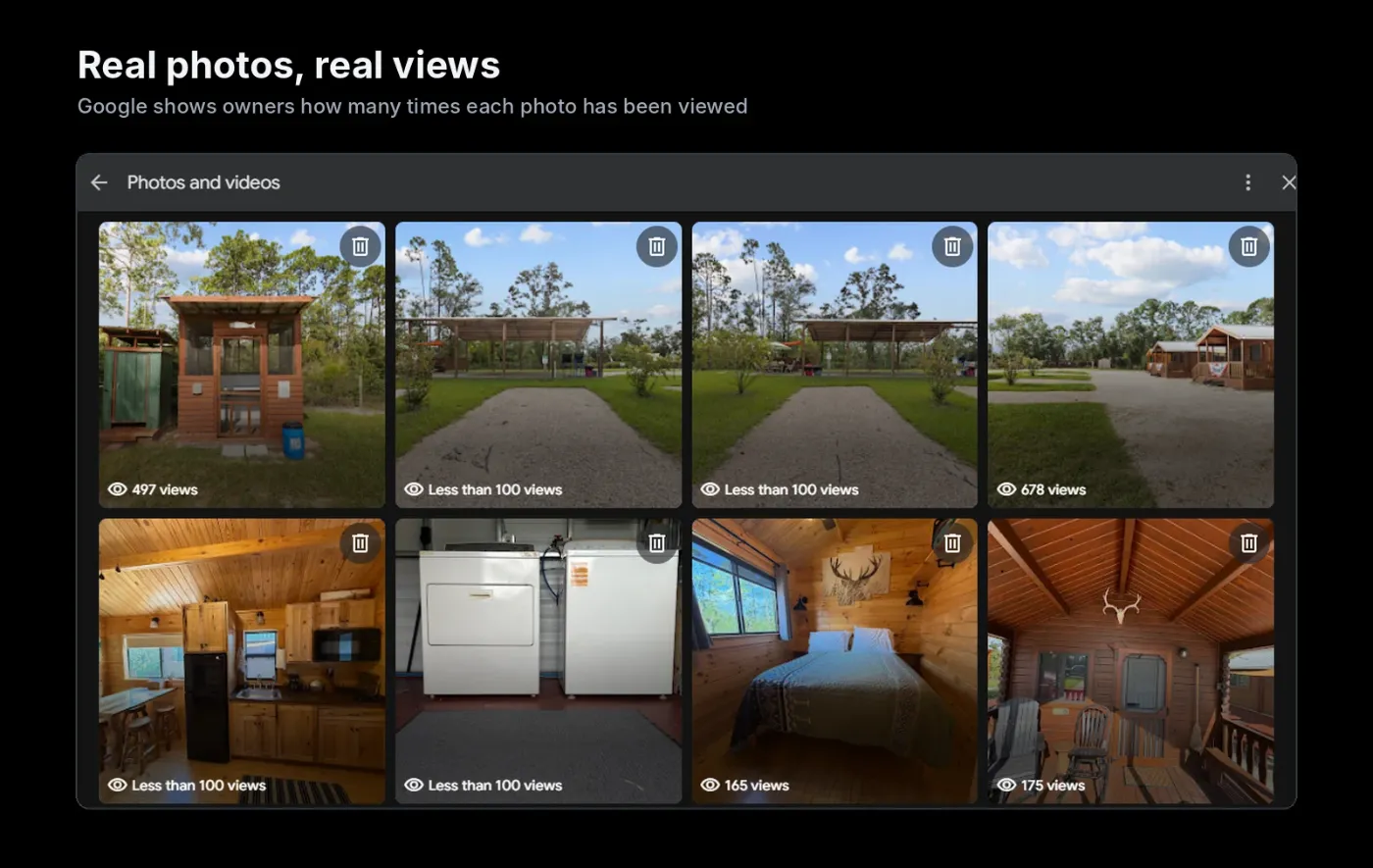
You'll read that photo count is a top ranking factor. The Whitespark 2026 Local Search Ranking Factors data says otherwise: photo quantity ranked #96, while photo and video quality ranked #45 and reviews with customer photos ranked #43. Photos matter most because they keep people on your profile, and engagement signals on the profile ranked #33.
What to upload:
- Your exterior, so people recognize the building (storefronts).
- Your team at work, real jobs and finished results.
- Vehicles and equipment for service-area businesses.
- Short videos of real work. Localo suggests keeping them under 30 seconds.
What to skip:
- Stock photos and AI-generated images. Whitespark's experts list AI-generated photos and videos as a negative factor and a suspension risk.
- Geotagging photos. It ranked dead last, #187 of 187. It's a myth.
- Anything that breaks Google's photo and video policies.
Add new photos monthly. Fresh uploads show the business is active and give returning visitors something new.
Step 9: Build a review system, not a review campaign
Review signals grew in importance more than any other group in the 2026 survey. Four review factors made the top 15: high rating (#6), number of text reviews (#9), recency (#11) and a sustained flow over time rather than bursts (#14).
That last one is the key. Joy Hawkins' research at Sterling Sky found that a steady flow of new reviews matters for keeping visibility. A business getting a few reviews every month can outrank one that got a big batch years ago and went quiet.
The system I set up for clients:
- Ask at the right moment: right after a job is finished or a visit goes well. See how to get more Google reviews for scripts.
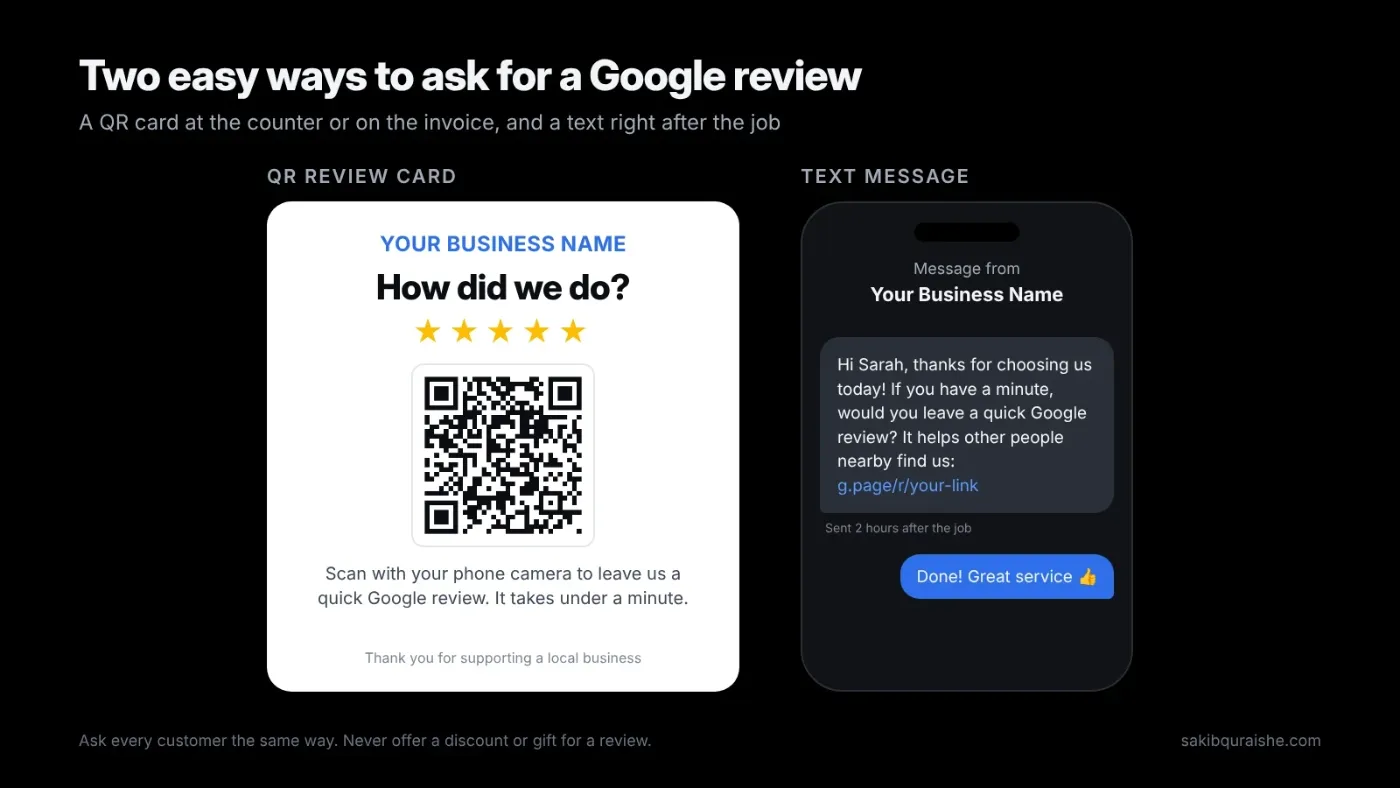
- Make it one tap: send your direct review link by text or email. Print a QR code for the counter or the invoice.
- Ask for detail, not keywords: "Would you mention what we did for you?" produces natural service and location words. Keywords in reviews ranked #36.
- Encourage photos: reviews with photos ranked #43.
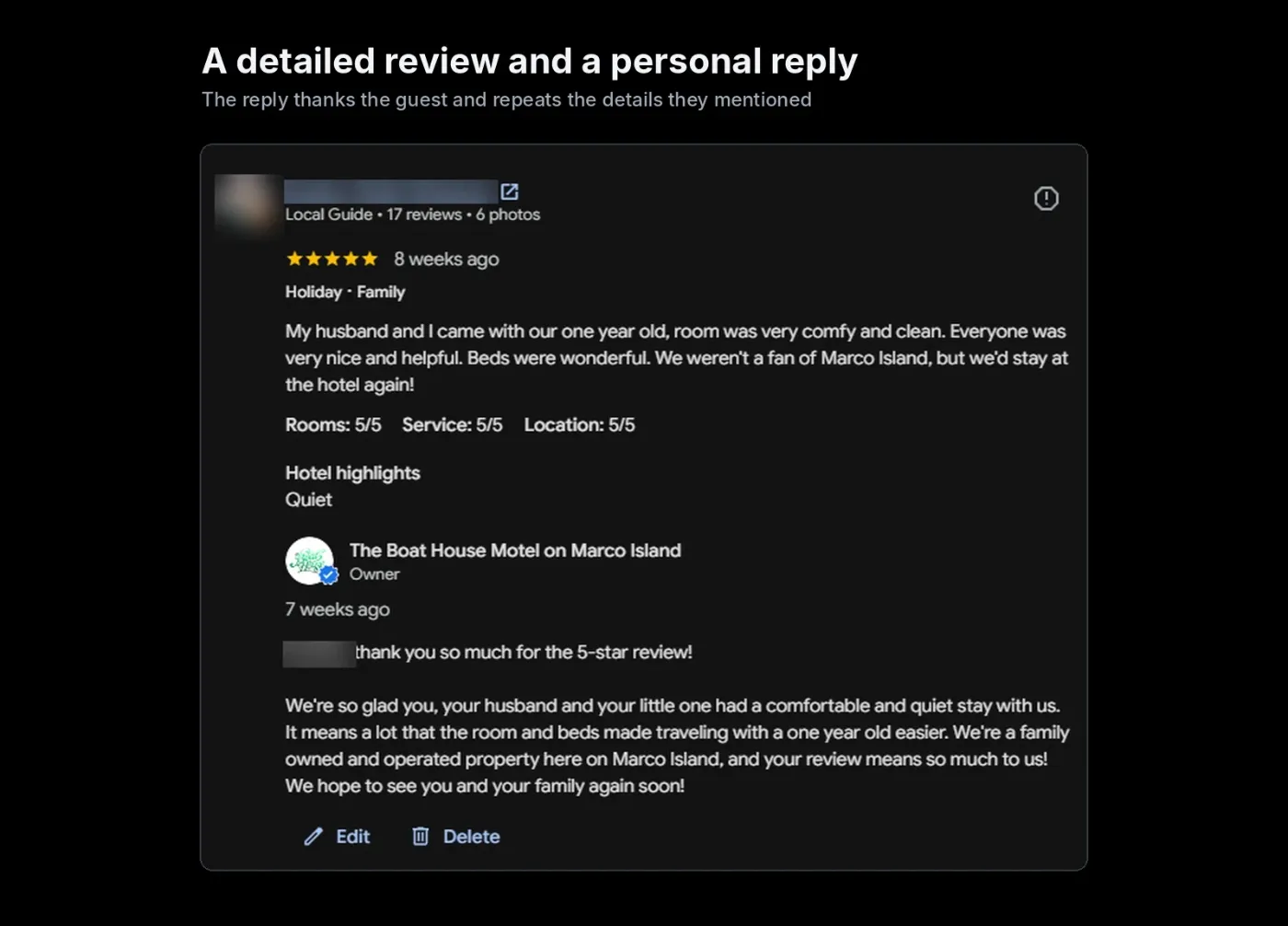
- Reply to every review: owner responses help conversions and trust. Don't stuff keywords into replies, though; that factor ranked #182. Use my review response templates.
- Follow the rules: no incentives, no gating, no fake reviews. Google's contribution policy bans them, and fake reviews get filtered or removed. Clinics have extra rules; see my review strategy for clinics.
Step 10: Posts: a conversion tool, not a ranking lever
Google posts come in three types: updates, offers and events. Every guide tells you to post weekly. But post frequency ranked #148 and keywords in posts #160 in the 2026 survey, and keyword-stuffed posts showed up as a suspension risk.
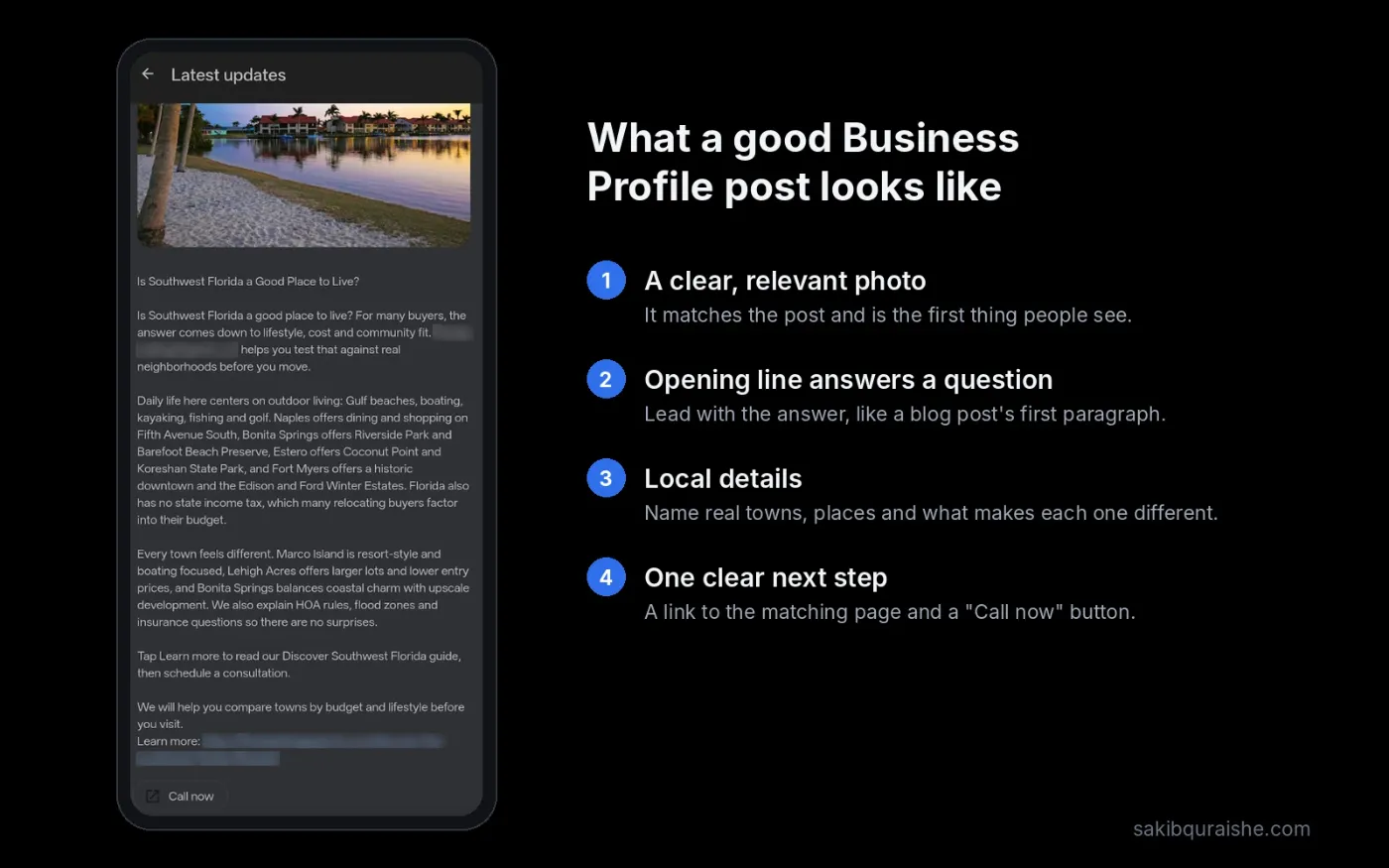
So why post at all? Because people who find your profile see them. A post about a seasonal offer, a recent project or a new service gives them a reason to call you instead of the next listing.
My rule: one useful post a week or two, each with a real photo and a clear call-to-action button. Write it for the customer. Skip the keyword lists.
Step 11: Fix the page your profile links to
Your GBP and your website work as a pair. Several landing-page factors sit in the 2026 top 20: NAP on the page matching your GBP (#15), keywords in the page title tag (#17) and keywords in its headings (#20). A dedicated page for each service ranked #24.
- Link your GBP to the page that best matches your primary category: usually the homepage for single-location businesses, a location page for multi-location ones. Running several branches? See multi-location SEO.
- Put your primary service and city in that page's title tag and H1.
- Show the exact same name, address and phone as your GBP, in plain HTML text. Here's why NAP consistency still matters.
- Add LocalBusiness schema to the page.
- Build service pages for each core service, and link to the GBP landing page from across your site. Serving several cities? Read ranking in multiple cities without thin location pages.
Step 12: Check your map pin
Pin placement ranked #10. A pin sitting on the wrong side of a highway or in the middle of a plaza can cost you rankings and confuse drivers. Open your listing on Google Maps, zoom in, and confirm the pin sits on your entrance. If it's wrong, adjust it in your profile settings.
Step 13: Fight spam in your market
Removing spam listings ranked #19. In many service niches, the map pack is full of fake listings and keyword-stuffed names. Each one you get removed is a spot you can move into.
- Look for names with keywords that don't match signage, fake addresses (virtual offices, UPS boxes) and duplicate listings.
- Use "Suggest an edit" on Maps for name and address problems.
- For larger or repeated cases, use Google's Business Redressal Complaint Form. BrightLocal has a step-by-step guide to reporting GBP spam, and I cover my own process in how to report fake Google Maps listings.
Step 14: Avoid the mistakes that get profiles suspended
A suspension wipes out your rankings overnight. These are the risks Whitespark's experts flagged, plus the ones I see most:
- Keyword stuffing your name, description or posts.
- Showing an address when you're a service-area business.
- Service areas larger than about two hours' drive.
- Overlapping service areas across multiple-location profiles.
- AI-generated text, photos or videos on the profile.
- A website URL that forwards to a different domain.
- Virtual office or coworking addresses without real staffed presence.
- Big edits all at once, especially name, address and category together.
If you do get suspended, don't create a new profile. Fix the violation, gather proof (business license, utility bill, signage photos) and request reinstatement. BrightLocal's suspension guide walks through the appeal, and my post on what to do when your Google Business Profile is suspended covers the causes I see most.
For mistakes beyond your profile, see the most common local SEO mistakes.
Step 15: Make your profile visible in AI search
People now ask ChatGPT, Gemini and Google's AI Overviews who to hire. Whitespark added AI search visibility scoring for the first time in 2026, and three of the top five AI factors were citation factors. As Darren Shaw puts it, in AI SEO mentions are the new links.
What that means in practice:
- Keep your business info consistent on the major directories in your industry, and fill every field.
- Get reviews on the review sites that matter in your niche, not only Google.
- Add a testimonials or reviews page to your site and link it in the main menu.
- Write service pages that answer real customer questions clearly, with headings and bullets.
- Earn local mentions: community events, local news, partner businesses.
For the full picture, read GEO explained: getting recommended by ChatGPT, Gemini and Perplexity, or see my AEO / GEO service.
Step 16: Measure with a GeoGrid scan, not a single ranking
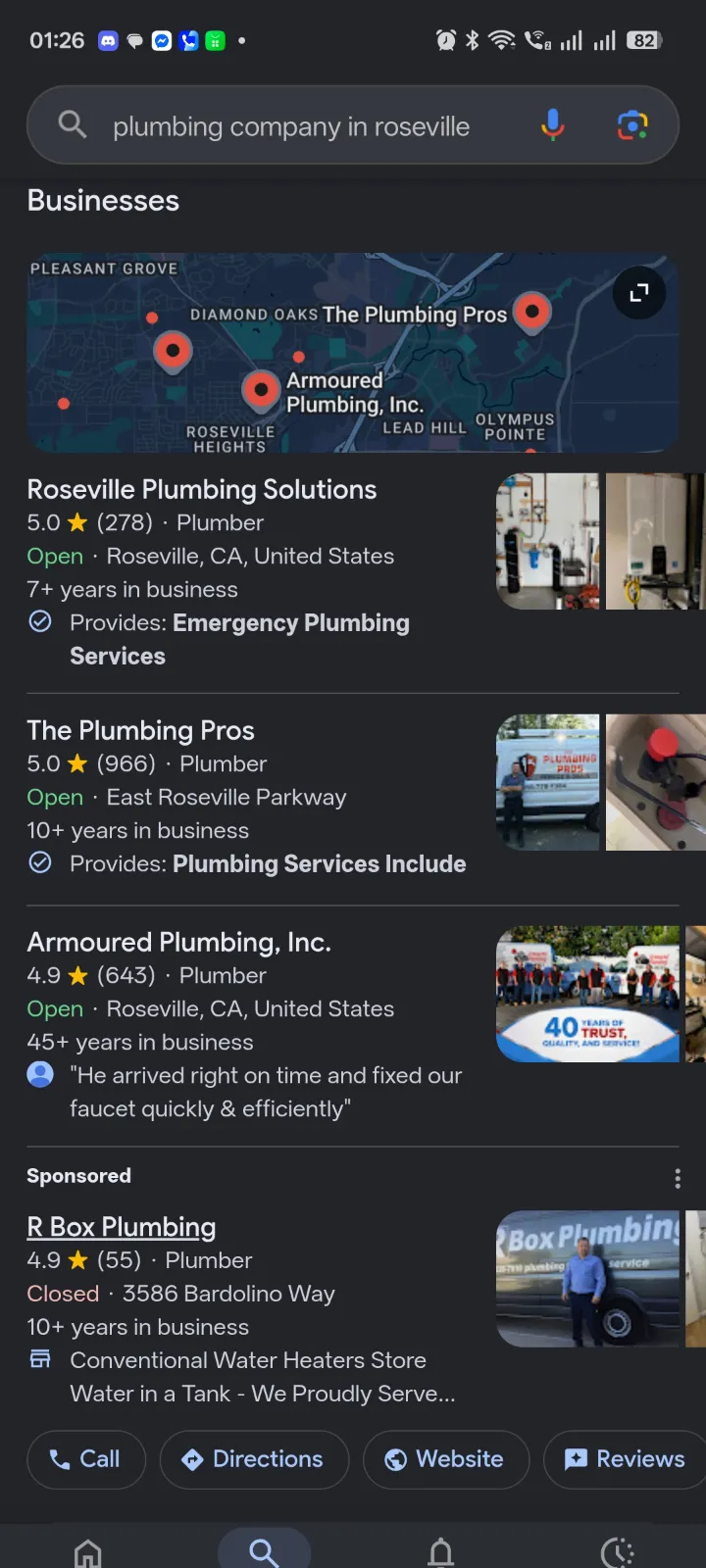
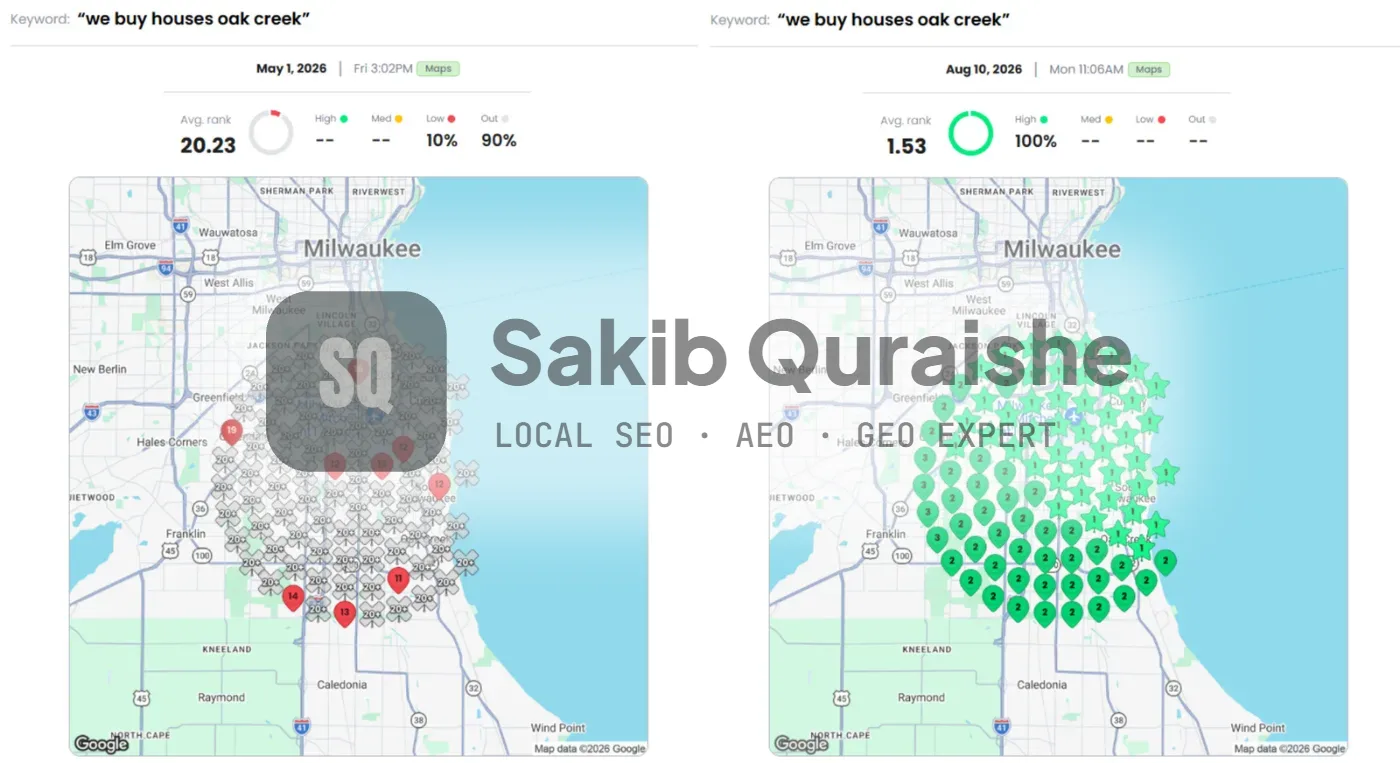
If you check rankings from your office, you'll almost always see yourself near the top. Your customers search from hundreds of other spots. Most local SEO reports I take over from other providers show one ranking from one location, which hides the real picture. A GeoGrid scan checks your rank from dozens of points across your service area and shows where you win and where you vanish. Learn how to read a GeoGrid scan.
Run a baseline scan before you change anything, then rescan monthly on the same keywords and grid.
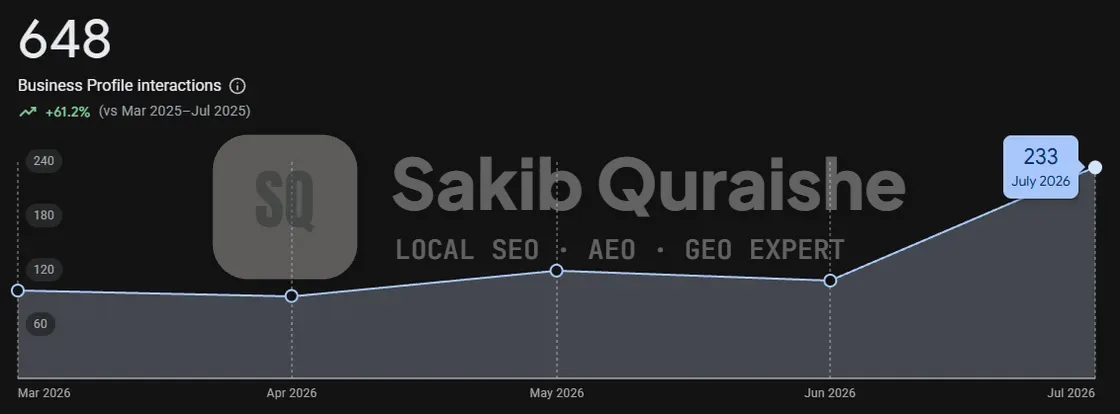
Here's what that looks like on a real campaign. For a cash home buyer in Oak Creek, WI, the average map rank on the main search moved from 20.23 to 1.53 in four months. The share of the grid where they didn't appear at all dropped from 90% to 0%, and clicks from Google rose 293.7%. Read the full case study, or see how the same approach worked for two roofers in PA and AZ and a new electrician in California.
Alongside the grid, track these in your GBP Performance report: calls, direction requests, website clicks and the search terms people used.
Want to see where you rank across your whole city? Request a free local map audit and I'll run a GeoGrid scan for your main keywords.
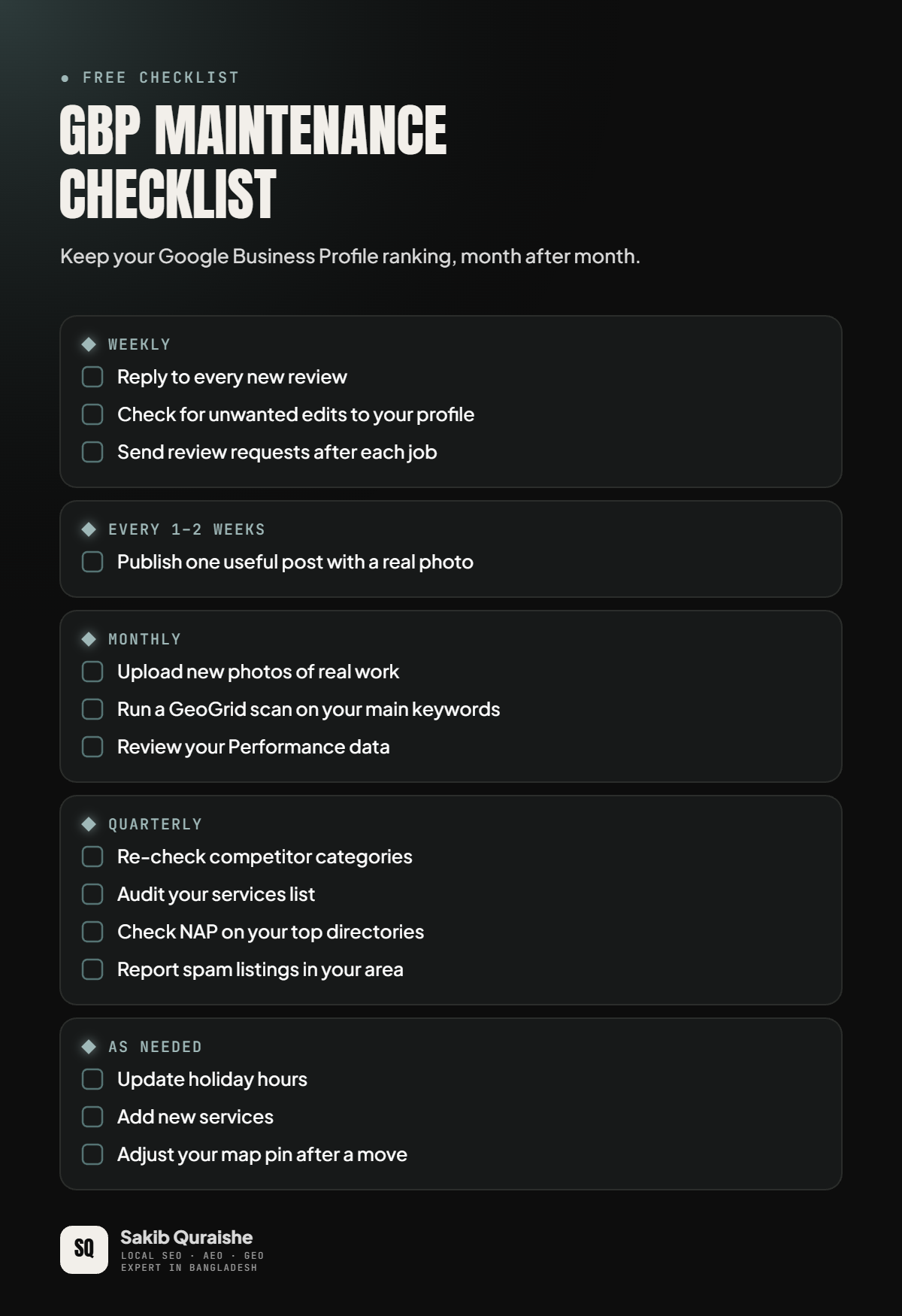
Your GBP maintenance schedule
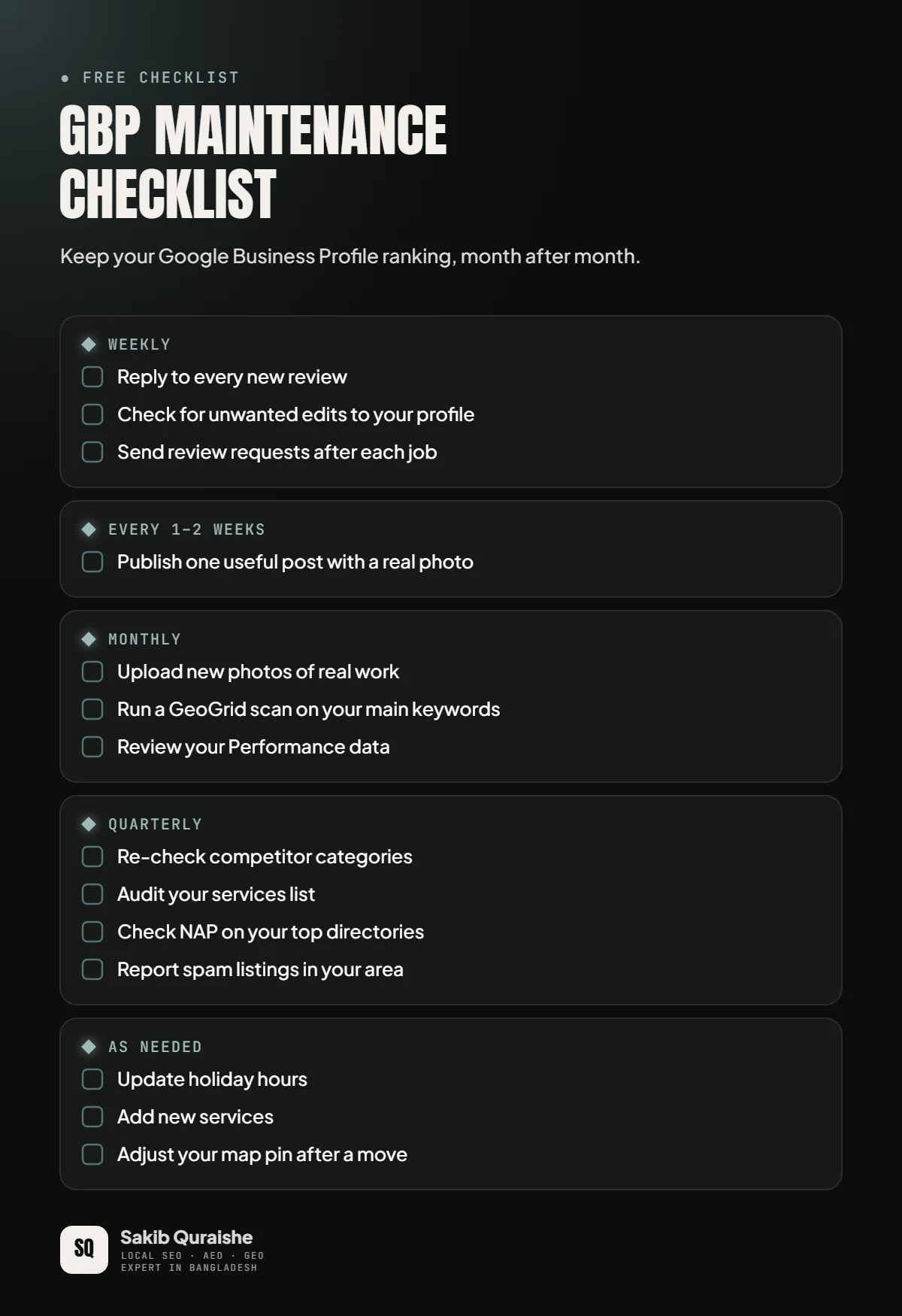
A profile is never done. Competitors edit theirs, reviews keep arriving and anyone can suggest edits to yours.
| How often | Task |
|---|---|
| Weekly | Reply to new reviews · check for unwanted edits · send review requests |
| Every 1–2 weeks | Publish one useful post with a real photo |
| Monthly | Upload new photos · run a GeoGrid scan · review Performance data |
| Quarterly | Re-check competitor categories · audit services · check NAP on top directories · report spam |
| As needed | Update holiday hours · add new services · adjust the pin after a move |
FAQ
How long does Google Business Profile optimization take to show results? Google Business Profile optimization usually takes 8 to 12 weeks to show clear map movement in the campaigns I run. Crowded metro markets or brand-new profiles can take three to six months. More in how long it takes to rank in the Google Maps 3-Pack.
Does adding keywords to my GBP description help rankings? Adding keywords to your GBP description helps rankings very little. It ranked #171 of 187 factors in Whitespark's 2026 survey, so write the description to convert readers.
Do Google posts improve rankings? Google posts improve rankings only slightly: post frequency ranked #148. Post because it helps people choose you.
Should I geotag my GBP photos? You shouldn't geotag your GBP photos for rankings. Geotagged photos ranked last of all 187 factors. Focus on real, high-quality, relevant photos.
Can I get to #1 on Google Maps everywhere in my city? You can rarely get to #1 on Google Maps everywhere in your city, because distance always plays a part. The goal is to expand the area where you rank in the top 3, and that's what a GeoGrid shows.
Can I pay Google for better map rankings? You can't pay Google for better map rankings. Google's help page on how local ranking works says so directly. Local Services Ads and Maps ads are separate, paid placements.
Need help optimizing your profile?
I've optimized 200+ Google Business Profiles across North America, the UK, Australia, Asia and Africa. If you'd rather have it done properly the first time, see my Local SEO service or request a free local map audit. Agencies can hand this work to me under their own brand through white label local SEO.
If you're comparing options, here's how much local SEO costs in 2026.
Sources
External sources linked in the draft:
- Step 6: Google: Guidelines for representing your business
- Step 8: Whitespark: 2026 Local Search Ranking Factors
- Step 8: Localo: GBP optimization and management guide
- Step 8: Google: Photo and video policies
- Step 9: Sterling Sky: Number of reviews and ranking
- Step 9: Google: Maps user contributed content policy (reviews)
- Step 13: BrightLocal: Google Business Profile spam
- Step 14: BrightLocal: Google Business Profile suspensions
- FAQ: Google: How to improve your local ranking
Mentioned by name but not linked: Sterling Sky's services research and Whitespark's predefined-services test (Step 3, above the external-link line). Competitor posts analysed: Coursera, Semrush, Localo and BrightLocal (linked in the gap table). The Reddit thread could not be accessed. Open the Sterling Sky review study before publishing to confirm the detail quoted.