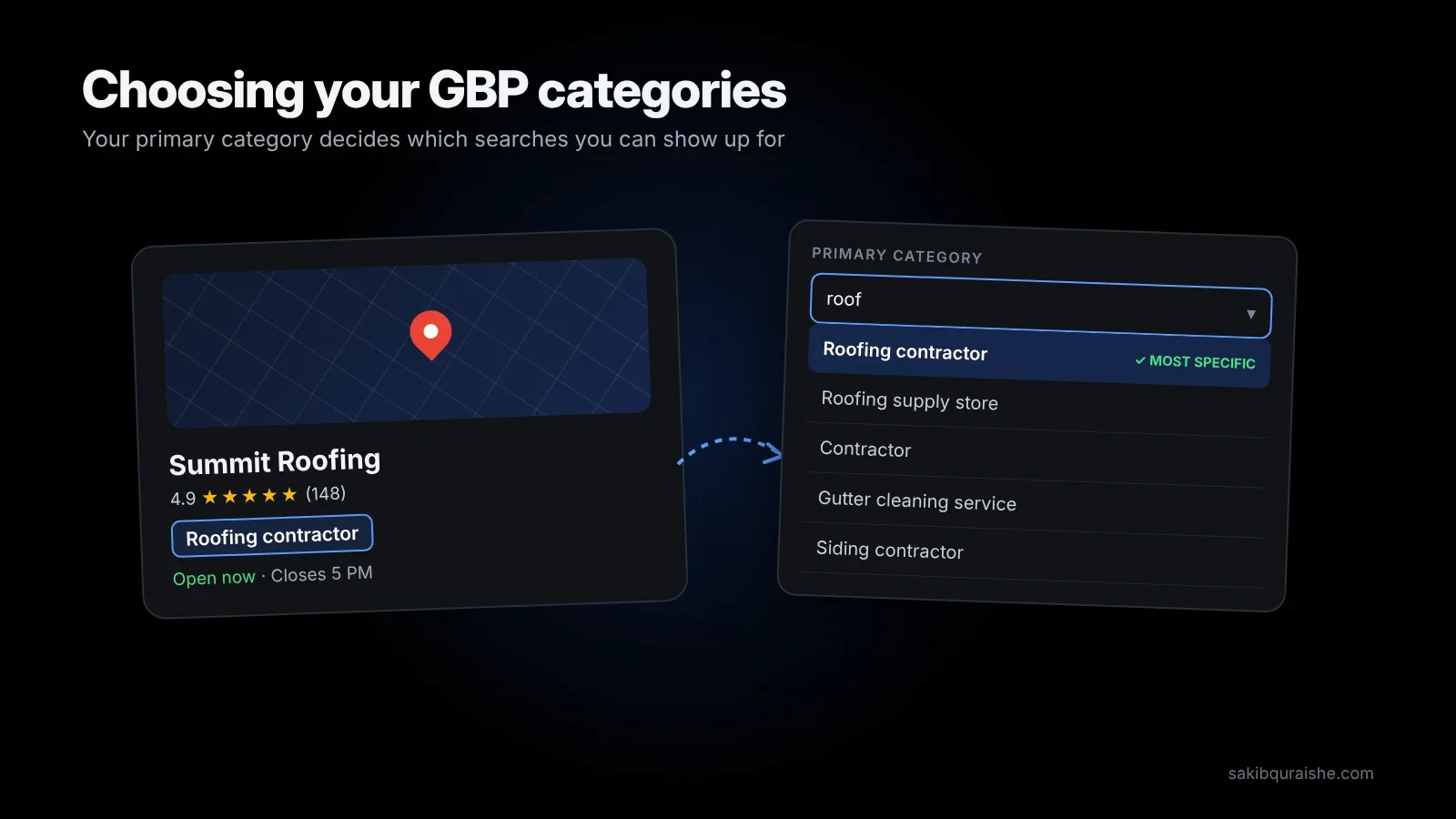
- Your primary category is the single biggest ranking decision on your profile. Pick the most specific one that matches the work you most want.
- Add every secondary category your business genuinely is. Adding relevant ones tends to help, not dilute.
- Check what the top 3 map competitors use before you decide.
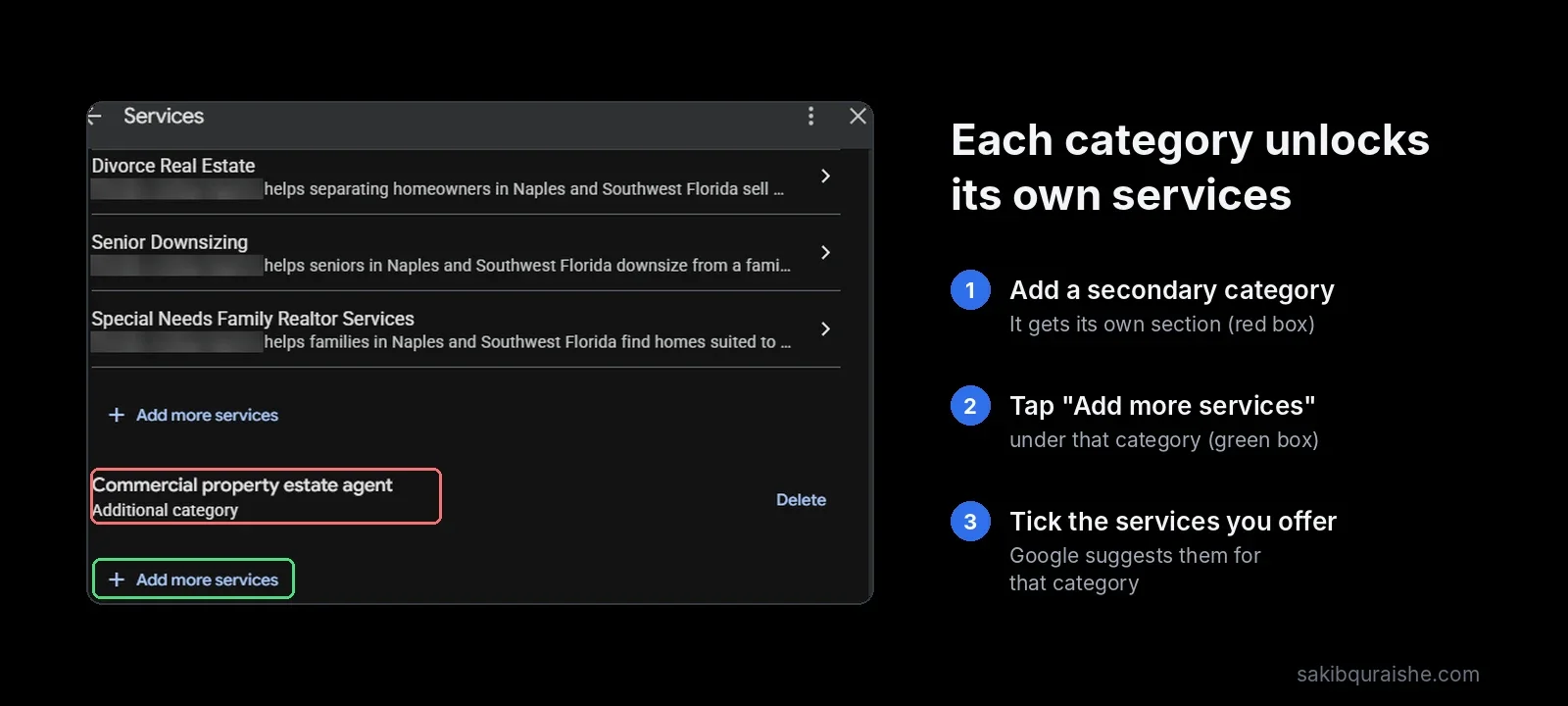
- Categories unlock Google's predefined services, so fill those in right after.
- Change one category at a time, measure with a GeoGrid scan, and be ready for re-verification.
When I audit a profile, the primary category is one of the first things I check, because it's so often wrong. A roofer listed as "Contractor". A personal injury firm listed as "Law firm". The owner usually has no idea it's holding them back. This guide shows how I pick categories for clients and how I test a change without gambling the rankings.
What are Google Business Profile categories?
Google Business Profile categories are labels from Google's fixed list that tell Google what your business is. You pick one primary category and can add up to nine secondary ones. You can't create your own; if nothing fits exactly, you choose the closest broader option.
The list has roughly 4,000 categories and changes often. Google adds, renames and removes them through the year, and the same category can show a different name in different countries.
Why does your primary category matter so much?
Your primary category matters so much because it decides which searches you're eligible to appear for. It was ranked the #1 local pack and Maps factor in Whitespark's 2026 Local Search Ranking Factors survey, ahead of proximity and reviews. If your category doesn't match a search, strong reviews and a great website won't fully make up for it.
Categories are one of several local ranking signals. See what is local SEO and how it works.
Primary vs secondary categories: what's the difference?
The difference between primary and secondary categories is weight and display. Your primary category carries the most ranking power and is the label customers see on your profile. Secondary categories add relevance for your other services but usually aren't shown publicly. Google's own category guidance says to keep additional categories for real departments or services, not every product you sell.
| Primary category | Secondary categories | |
|---|---|---|
| How many | Exactly 1 | Up to 9 |
| Shown to customers | Yes | Usually not |
| Ranking weight | Highest | Real, but lower |
| Should describe | Your core, highest-value service | Other things your business genuinely is |
How do you choose your primary category?
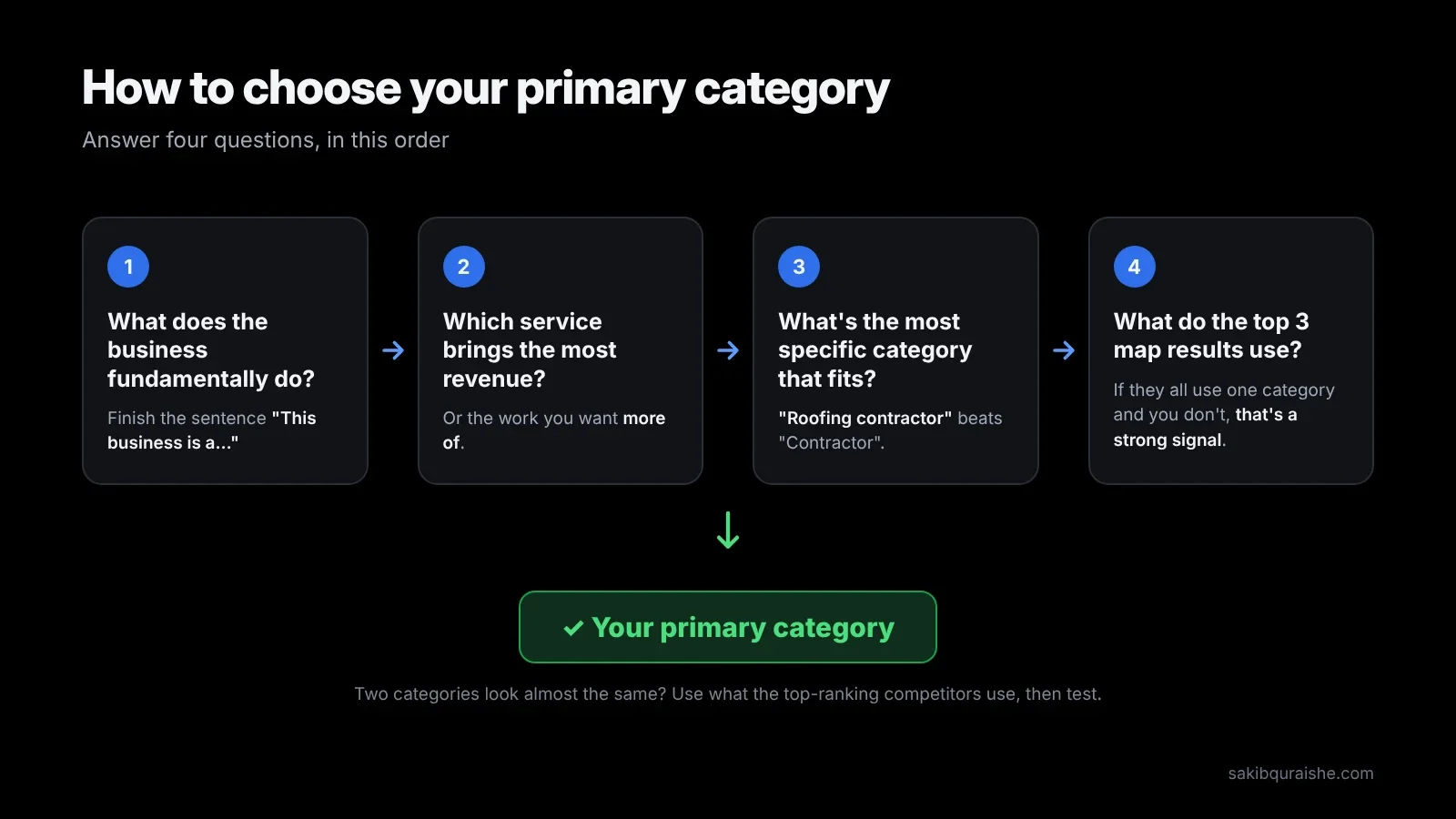
You choose your primary category by answering four questions in order:
- What does the business fundamentally do? Finish the sentence "This business is a…". Think about what it is, not what it has.
- Which service brings the most revenue, or the most work you want more of? The primary should match that.
- Which is the most specific category that fits? "Roofing contractor" beats "Contractor". "Divorce lawyer" beats "Law firm".
- What do the top 3 map results for your main keyword use? If they all use one category and you don't, that's a strong signal.
If two categories look almost identical, go with what the top-ranking competitors use, then test (covered below).
How do you find the categories your competitors use?
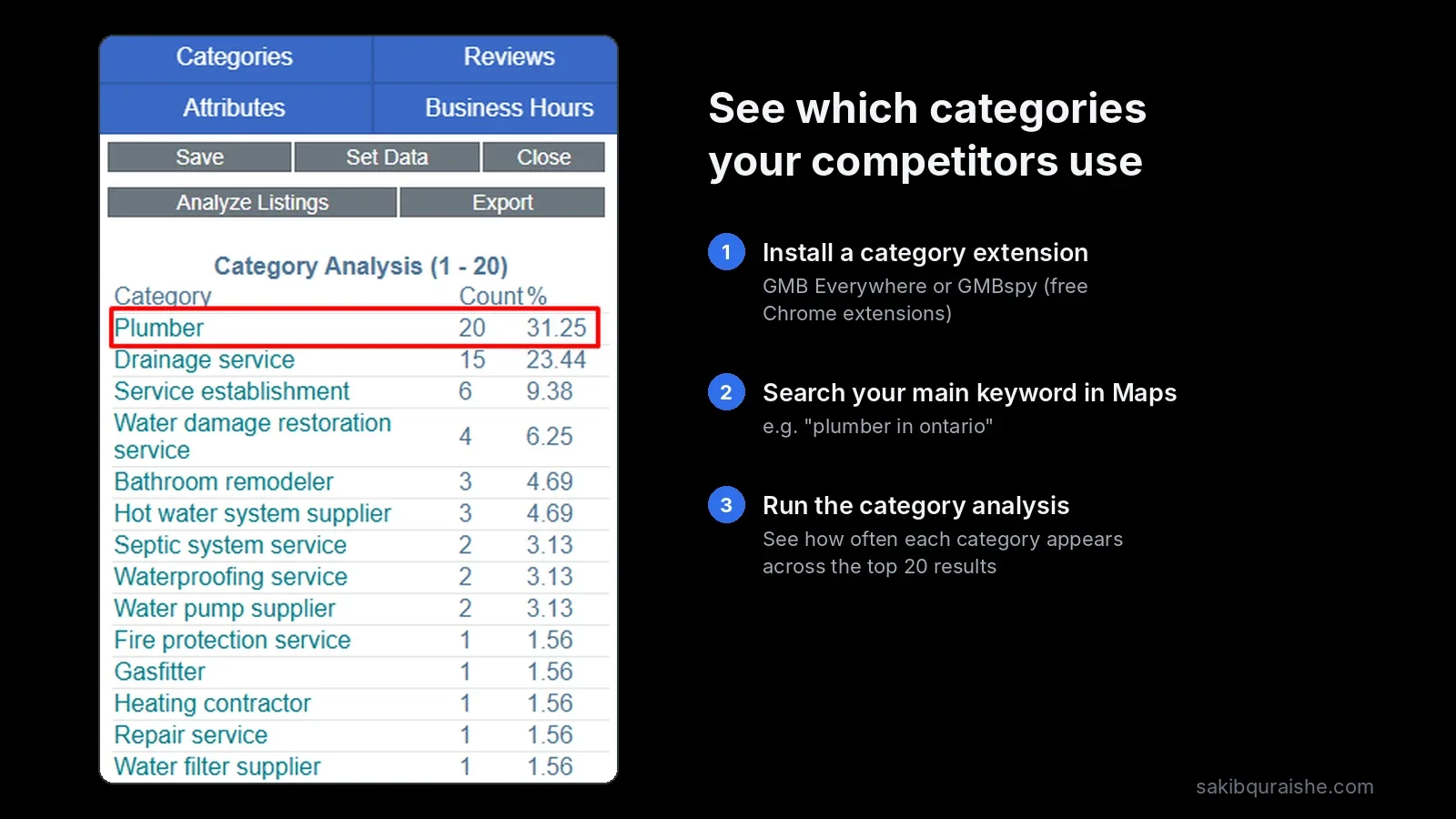
You find competitors' categories with a free browser extension, because Google only shows the primary category publicly.
- Install GMB Everywhere or PlePer for Chrome.
- Search your main keyword in Google Maps from your service area, such as "emergency plumber Tampa".
- Note the primary and secondary categories of the top 3–5 results.
- Look for patterns. Categories most top competitors share are usually worth adding if you genuinely offer that service.
How many secondary categories should you add?
You should add as many secondary categories as your business genuinely is, and no more. Advice online ranges from "keep it to two or three" to "use all nine", usually without evidence. The evidence that exists points one way:
- Additional categories ranked #8 of 187 local pack factors in the Whitespark 2026 Local Search Ranking Factors.
- Sterling Sky's testing found that adding relevant categories often improved rankings, which contradicts the idea that extra categories "dilute" your profile. In one of their cases, a Florida personal injury firm that added "Employment attorney" improved for employment searches within about 48 hours.
The limit isn't a number. It's honesty. A category you don't actually offer won't win you customers, invites edits from Google, and can be treated as misrepresentation.
Skip broad categories that add nothing. If you're a "Personal injury attorney", adding "Lawyer" rarely helps.
How do categories unlock services and features?
Categories unlock services and features because Google ties both to the categories you pick. According to Google's category help page, restaurants can add menus and ordering links, hotels can show amenities and class ratings, and health and beauty businesses can add booking buttons and service lists.
The most important link for rankings is services. Each category comes with a set of predefined services, and those services ranked #22 in Whitespark's 2026 survey. So every time you add a category, open the Services section and tick the new predefined options you offer. I explain how in GBP services: how to fill them for rankings, and my Google Business Profile checklist covers the full setup.
How do you change a category without losing rankings?
You change a category without losing rankings by changing one thing at a time and measuring before and after. Here's the process I use:
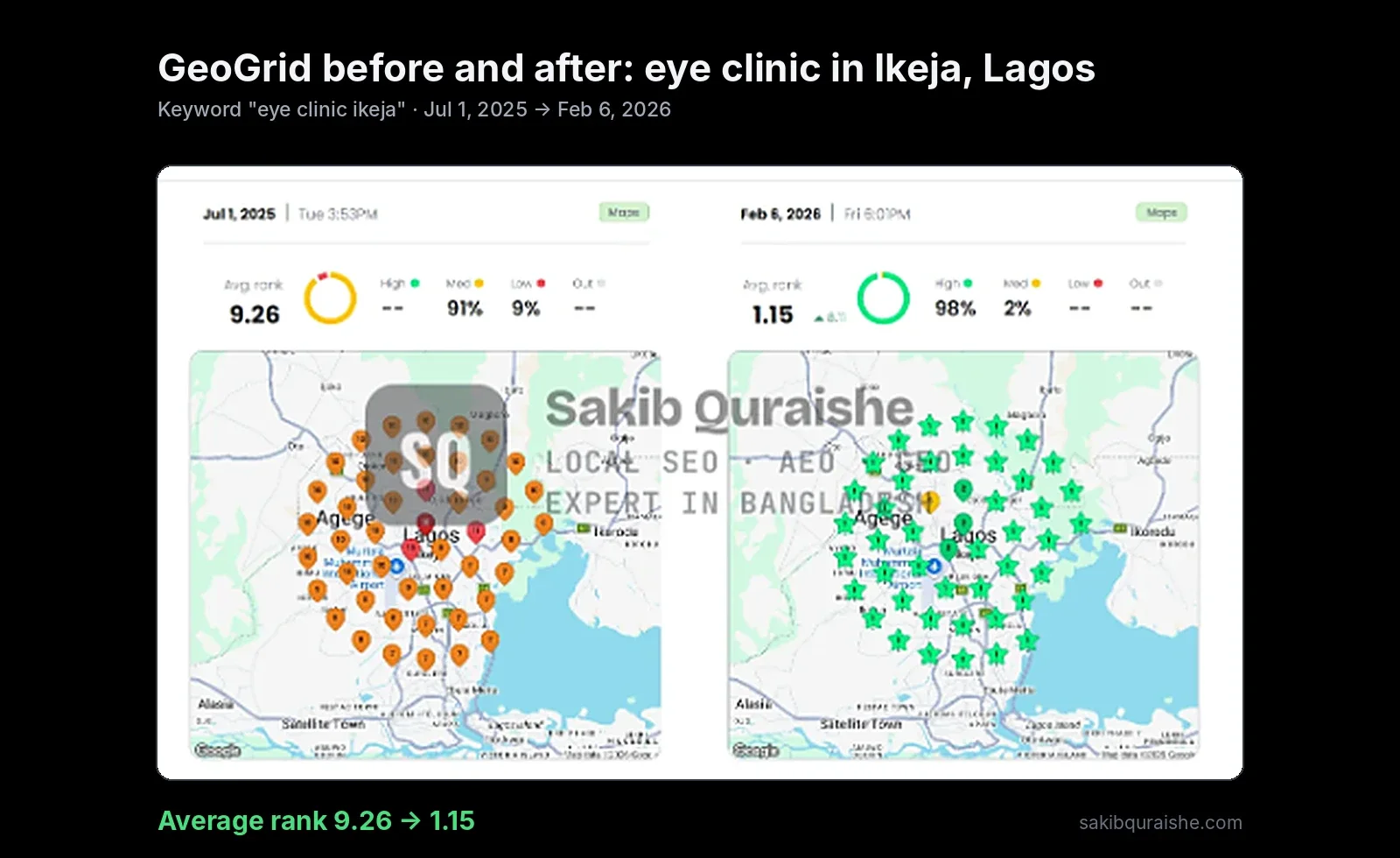
- Take a baseline GeoGrid scan for the keywords the change should affect, plus your main keyword. More on reading scans in how to read a GeoGrid scan.
- Prepare for re-verification. Google warns that adding or changing a category may require you to verify again. Have proof ready: signage, a utility bill or license, and the ability to record a short video of the premises. If it stalls, see GBP verification problems and how to fix them.
- Avoid your busiest season. If re-verification hides your profile for a few days, you want it to happen in a quiet week.
- Make one change. Don't change the name, address and categories together.
- Rescan at 2 weeks and 4 weeks on the same grid and keywords.
- Keep it or revert. If the target keywords improved without hurting your main keyword, keep it. If your main keyword dropped, revert.
Primary category changes cut both ways. Sterling Sky describes an HVAC client that fell from #1 to #31 after switching from "Air conditioning repair service" to "Air conditioning contractor", then recovered in about two weeks after switching back. That's a single case, but it's exactly why you measure.
Should you change your primary category by season?
You should change your primary category by season only if your work genuinely flips, such as an HVAC company that's mostly air conditioning in summer and heating in winter, or a lawn care business that becomes snow removal. BrightLocal and Whitespark both suggest this for seasonal businesses.
The trade-off is risk. Every primary change can trigger re-verification and a short wobble in rankings. If your seasons overlap, keep one primary and make the seasonal service a secondary category instead.
How should service-area and multi-location businesses pick categories?
Service-area businesses pick categories the same way as storefronts; the category rules don't change when you hide your address. What changes is how you rank across your area, covered in service-area business vs storefront businesses in local SEO.
Multi-location businesses should match each location's categories to the work that location actually does. Branches offering the same service should share the same primary category. If a department inside your location is run independently and open to the public, such as a café inside a gym, Google says it should have its own profile rather than a category on yours. For larger networks, see my multi-location SEO service.
Category mistakes I see in audits
- A broad primary ("Contractor", "Law firm", "Clinic") when a specific one exists
- Secondary categories for services the business doesn't offer
- A primary that matches a minor service, not the main revenue line
- Categories added, but predefined services never filled in
- Name, address and category changed in the same week, followed by a verification hold
- Never checking for new categories that fit better
A related mistake is stuffing service words into the business name to make up for a weak category. Here's why that backfires: keyword stuffing in business names.
For the rest of the profile, see my complete guide to Google Business Profile optimization.
For mistakes outside categories, see the most common local SEO mistakes.
FAQ
How many categories can you have on Google Business Profile? You can have 10 categories on Google Business Profile: one primary and up to nine secondary categories.
Can you change your Google Business Profile category? You can change your Google Business Profile category at any time from Edit profile, but Google may ask you to verify again, and rankings can shift for a week or two.
Do secondary categories help rankings? Secondary categories help rankings when they describe services you genuinely offer. Additional categories ranked #8 of 187 factors in Whitespark's 2026 survey.
What if my exact category doesn't exist? If your exact category doesn't exist, choose the closest broader category, then describe your specialty in your services and description.
How often should you review your categories? You should review your categories every three to six months, because Google adds and renames categories regularly and a new, more specific one may fit you better.
Not sure your categories are right?
I'll check your categories against your top competitors and run a GeoGrid scan for your main keywords, free. Request a free local map audit, or see my full Local SEO service.
Want your categories and services set up for you? See my Google Business Profile optimization service.
Sources
- Google: Choose or edit business categories
- Whitespark: 2026 Local Search Ranking Factors
- Sterling Sky: Categories in Google Business Profile
- Sterling Sky: Ultimate checklist (HVAC category example)
- BrightLocal: GBP categories and Whitespark: Categories chapter (seasonal switching, mentioned by name)
Competitor posts read: BrightLocal, Dalton Luka, Sterling Sky, Local Falcon, Local Dominator, Whitespark, Flento, OllyOlly, plus Google's help page.