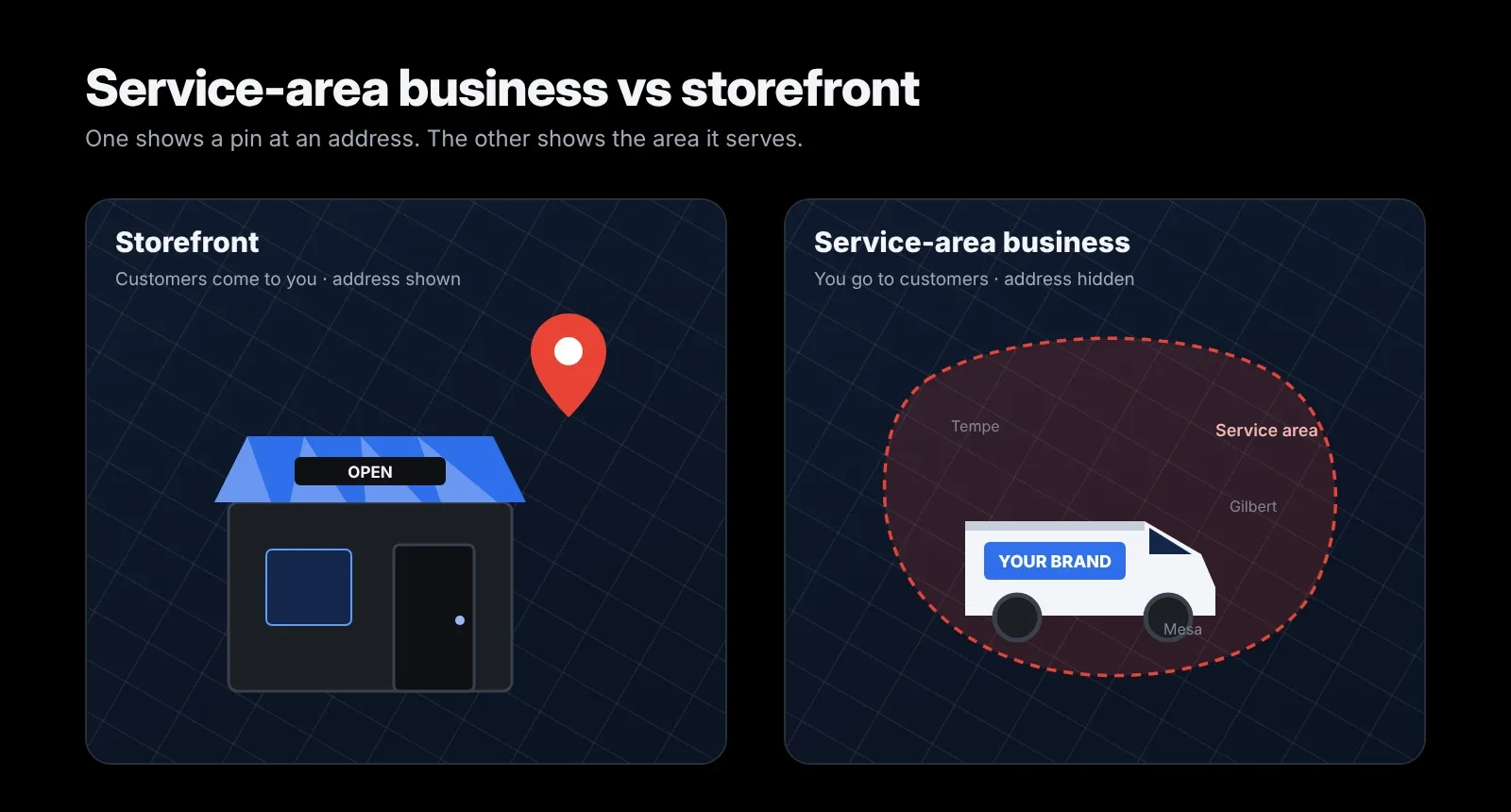
- A storefront serves customers at its address. A service-area business (SAB) travels to customers and hides its address. A hybrid does both.
- For both types, Google ranks you mainly from your verified address. Service areas show customers where you work but don't extend your rankings.
- Switching between types can move your rankings, so don't do it casually.
- SABs win beyond their base with strong reviews, focused service and city pages, and long-tail keywords.
- The biggest risks: showing an address you don't serve customers at, and service areas that are too large.
Service-area businesses make up a large part of my client work: roofers, plumbers, electricians and cash home buyers. The most common problem I see is a business set up as the wrong type, or one that expects its service areas to do work they can't do. This guide sets out how the two types differ across every part of local SEO, not just the profile settings.
What is a service-area business?
A service-area business is a business that travels to customers or delivers to them, but doesn't serve customers at its own address. Plumbers, roofers, mobile dog groomers, cleaners and most home-service trades are SABs. On Google, an SAB hides its address and lists the areas it serves instead.
What is a storefront business?
A storefront business is a business that customers visit at a staffed address during opening hours, such as a dental clinic, restaurant, shop or salon. Google expects storefronts to have permanent signage at that address.
What is a hybrid business?
A hybrid business is a business that serves customers at its address and also travels to or delivers to customers, such as a pizza place that delivers or an auto glass shop with mobile service. Under Google's service-area rules, hybrids show their address and also set a service area, but only if they have permanent signage at that address.
Which one is your business?
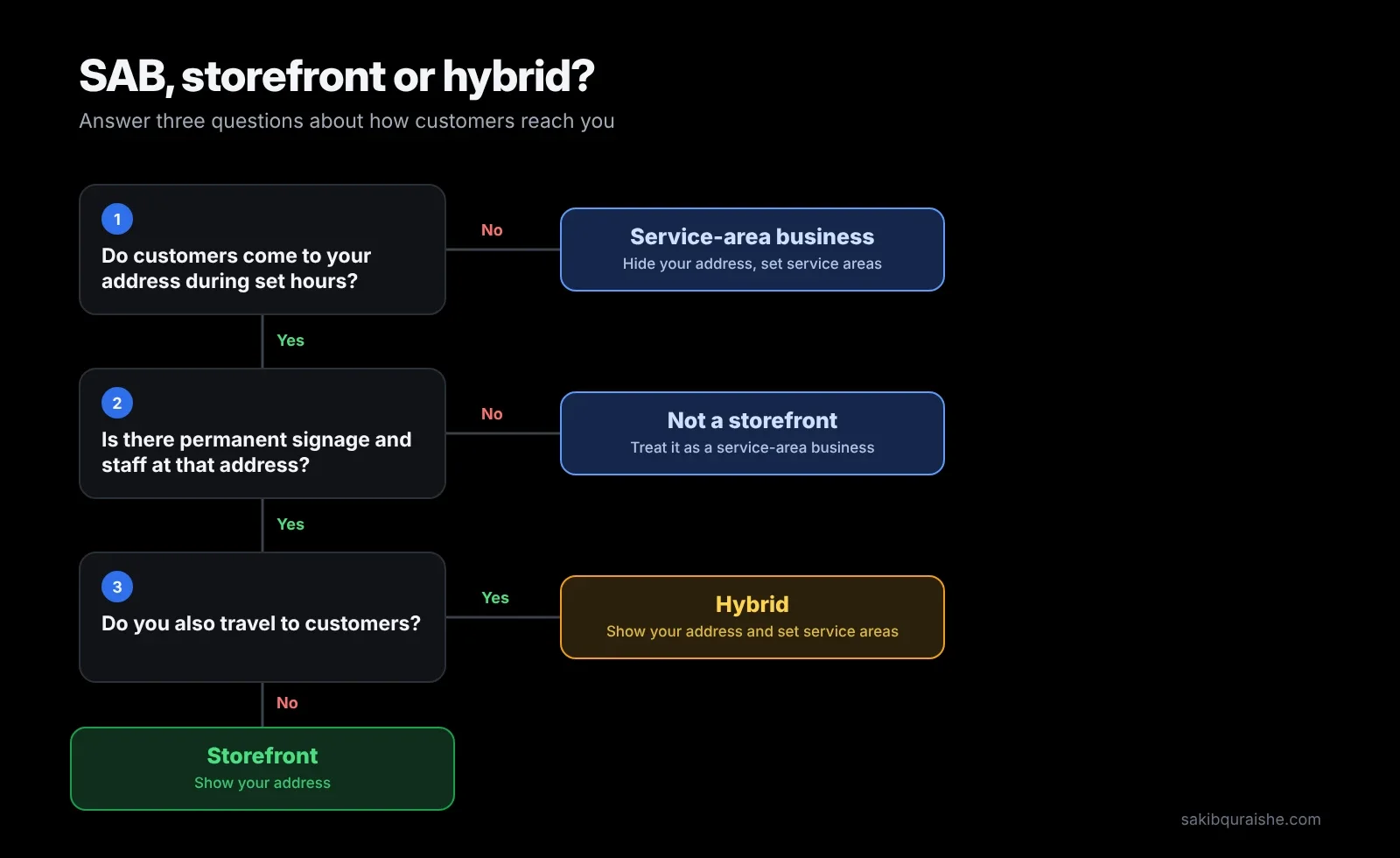
Your business type comes down to three questions:
- Do customers come to your address during set hours? If no, you're a service-area business. Hide the address.
- Is there permanent signage and staff at that address? If no, you can't be a storefront, even if you have an office.
- Do you also travel to customers? If yes and you answered yes to both questions above, you're a hybrid.
A home-based business that never has customers visit is an SAB. A virtual office or coworking desk you don't staff isn't an address customers can visit, so don't show it.
Not sure local SEO fits your business at all? See which businesses need local SEO.
Service-area business vs storefront: side by side
| Service-area business | Storefront | Hybrid | |
|---|---|---|---|
| Address on profile | Hidden | Shown | Shown |
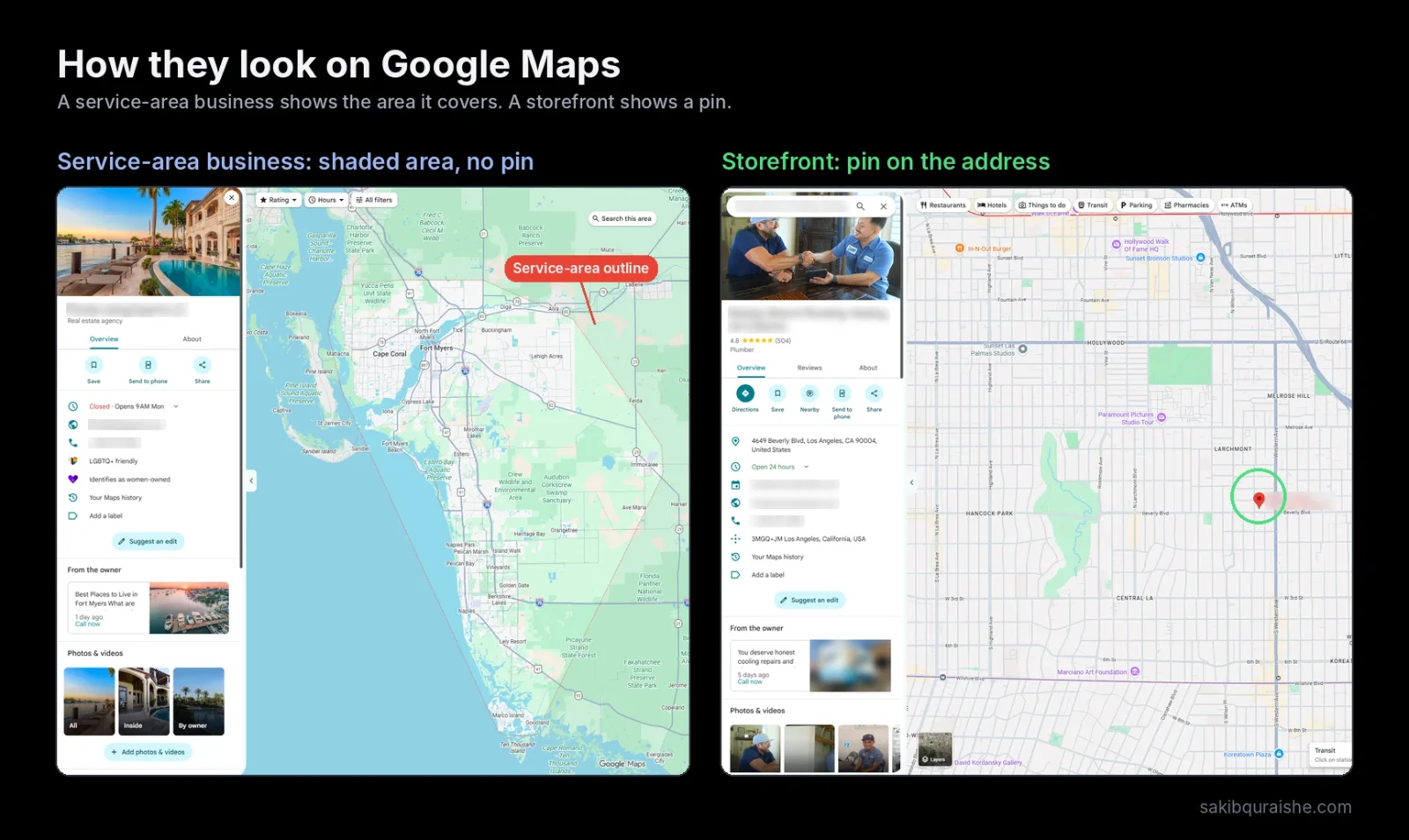
| How it shows on Maps | Shaded service area, no pin | Pin at the entrance | Pin + service area |
| What rankings are based on | Verified address (still used, just hidden) | Address shown | Address shown |
| Hours | When you take calls or jobs | When customers can visit | When staff are available |
| Signage needed | No | Yes | Yes |
| Website NAP | Name, phone and areas served; address optional | Full name, address, phone | Full name, address, phone + areas served |
| Citations | Directories that allow a hidden address | Standard citations with full address | Standard citations with full address |
| Schema | LocalBusiness with areaServed | LocalBusiness with address and geo | Both |
| Biggest risk | Showing an address you don't serve at | Moving without updating everything | Service area larger than you cover |
How does ranking differ for service-area businesses and storefronts?
Ranking differs less than most owners think. For both types, Google ranks you mainly from your verified address, even when that address is hidden. Your primary category, reviews and website still decide how far out from that point you can rank. This is also why owners often rank well at the office and disappear a few miles away; I explain it in why you rank at your office but not 2 miles away.
The practical difference is visibility of the address. In Whitespark's 2026 Local Search Ranking Factors survey, experts ranked "address is showing on GBP" #7 for local pack rankings. But Darren Shaw, who runs the survey, doubts it's a true factor; he's seen cases where hiding the address changed nothing, and others where rankings simply moved back to the address the profile was first verified at. More on that below.
For how local rankings work in general, see what is local SEO and how it works.
Do service areas affect rankings?
Service areas don't affect rankings, according to the published testing. Sterling Sky tracked a pure SAB listing with Toronto set as a service area, while its real address was in Uxbridge, Ontario. The listing never ranked in its Toronto service area; rankings followed the verified address.
So set service areas to show customers where you work, not to rank further away. Google's rules for service-area businesses:
- Up to 20 service areas, set as cities, postal codes or other areas
- Overall boundaries within about 2 hours' driving time of your base
- No radius around your business; use named areas
- Edits can take up to 48 hours to appear
How do you set up each type on Google Business Profile?
Service-area business
- When asked if customers can visit your location, choose no (or remove the address from an existing profile in Edit profile → Location).
- Add the cities or postal codes you serve. Pick the outer edges of your territory so the whole area is covered.
- Use a business phone line, not a personal mobile.
- Set hours for when you take calls or bookings.
Storefront
- Enter the exact address where customers visit and check that the pin sits on your entrance.
- Make sure permanent signage with your business name is visible there.
- Don't add service areas unless you also travel to customers.
Hybrid
- Show your address and set hours for when staff are available.
- Add service areas only for places you genuinely travel to.
The rest of the profile works the same for both: see my Google Business Profile checklist and guide to choosing GBP categories.
What happens if you switch from storefront to service-area business?
Switching from storefront to service-area business can move your rankings, so plan it rather than flicking a setting. Darren Shaw describes two patterns in the Whitespark 2026 Local Search Ranking Factors:
- Rankings move back to the original address. If the profile was first verified somewhere else and later moved, hiding the address can make Google fall back to the original verification address.
- Rankings land somewhere random. In some cases, Google appears to lose the location and place the business elsewhere. He describes one car detailer whose rankings showed up about 200 miles away.
Before you switch:
- Take a GeoGrid scan of your main keywords. Here's how to read a GeoGrid scan.
- Switch only because your business genuinely changed, not to chase rankings.
- Rescan after a week and again after a month. If rankings have vanished or moved, a wider grid can help you find where Google now places you.
How can a service-area business rank beyond its base?
A service-area business ranks beyond its base by building relevance and prominence, since distance from the verified address doesn't change. What works in my campaigns:
- Win the core first. Rank strongly near your base before expanding outward.
- Steady, detailed reviews. Reviews that mention the job and the town help both rankings and conversions.
- A strong page for each core service, and city pages only where you have real local detail: jobs done, photos, reviews from that area. Avoid copy-paste pages with a swapped city name. More in ranking in multiple cities without thin location pages.
- Long-tail keywords. Specific searches ("metal roof repair Scottsdale") tend to rank across a wider area than broad ones.
- Local Services Ads in categories where they show, for paid reach beyond your organic map area.
You can see this approach in my case studies: two roofers in PA and AZ, a new electrician in California and a cash home buyer in Wisconsin, all service-area businesses.
Targeting specific neighborhoods is covered in what is hyperlocal SEO.
How do websites, citations and schema differ?
Websites, citations and schema differ mainly in how you handle the address.
- Website: Storefronts show the full name, address and phone on the page their profile links to. SABs show name and phone, list the areas served, and can show their address only if they're comfortable with it being public. Either way, the details must match your profile. Here's why NAP consistency still matters.
- Citations: SABs should use directories that let you hide the address, and keep name and phone identical everywhere.
- Schema: Storefronts use LocalBusiness with address and geo coordinates. SABs use LocalBusiness with areaServed listing the cities or regions. See LocalBusiness schema.
For help with schema, see my Technical SEO service. For citations, see my Local Link Building service, which includes niche and local directories.
Which mistakes can get either type suspended?
These are the risks Whitespark's 2026 survey and my audits flag most:
- Showing an address on the profile when you're a service-area business
- Service areas larger than about two hours' drive
- Overlapping service areas across multiple-location profiles
- A virtual office or unstaffed address shown as a storefront
- Employees' home addresses used to create extra listings
Extra listings made from staff home addresses usually end up as duplicates; here's how to find and merge duplicate listings. If a suspension happens, here's what to do when your Google Business Profile is suspended. Running several locations? See my multi-location SEO service.
FAQ
Can a service-area business rank in Google Maps? A service-area business can rank in Google Maps. It shows as a shaded area instead of a pin, and its rankings are based on its hidden verified address.
Should I hide my address on Google Business Profile? You should hide your address on Google Business Profile if customers don't visit you there. Showing an address you don't serve customers at breaks Google's guidelines.
How many service areas can I add? You can add up to 20 service areas, and the overall area should stay within about two hours' drive of your business.
Do service areas help me rank in other cities? Service areas don't help you rank in other cities. They show customers where you work; rankings still come from your verified address, reviews and relevance.
Can a home-based business have a Google Business Profile? A home-based business can have a Google Business Profile as a service-area business, with the home address hidden.
Not sure how your profile is set up?
I'll check whether your profile is set up as the right type and run a GeoGrid scan across your service area, free. Request a free local map audit, or see my Local SEO service.
To have your profile set up correctly for your business type, see my Google Business Profile optimization service.
Sources
- Google: Manage your service area
- Sterling Sky: Does the service area impact ranking?
- Whitespark: 2026 Local Search Ranking Factors
- Competitor posts read: Google help, BrightLocal, OllyOlly, See Response, Sterling Sky.