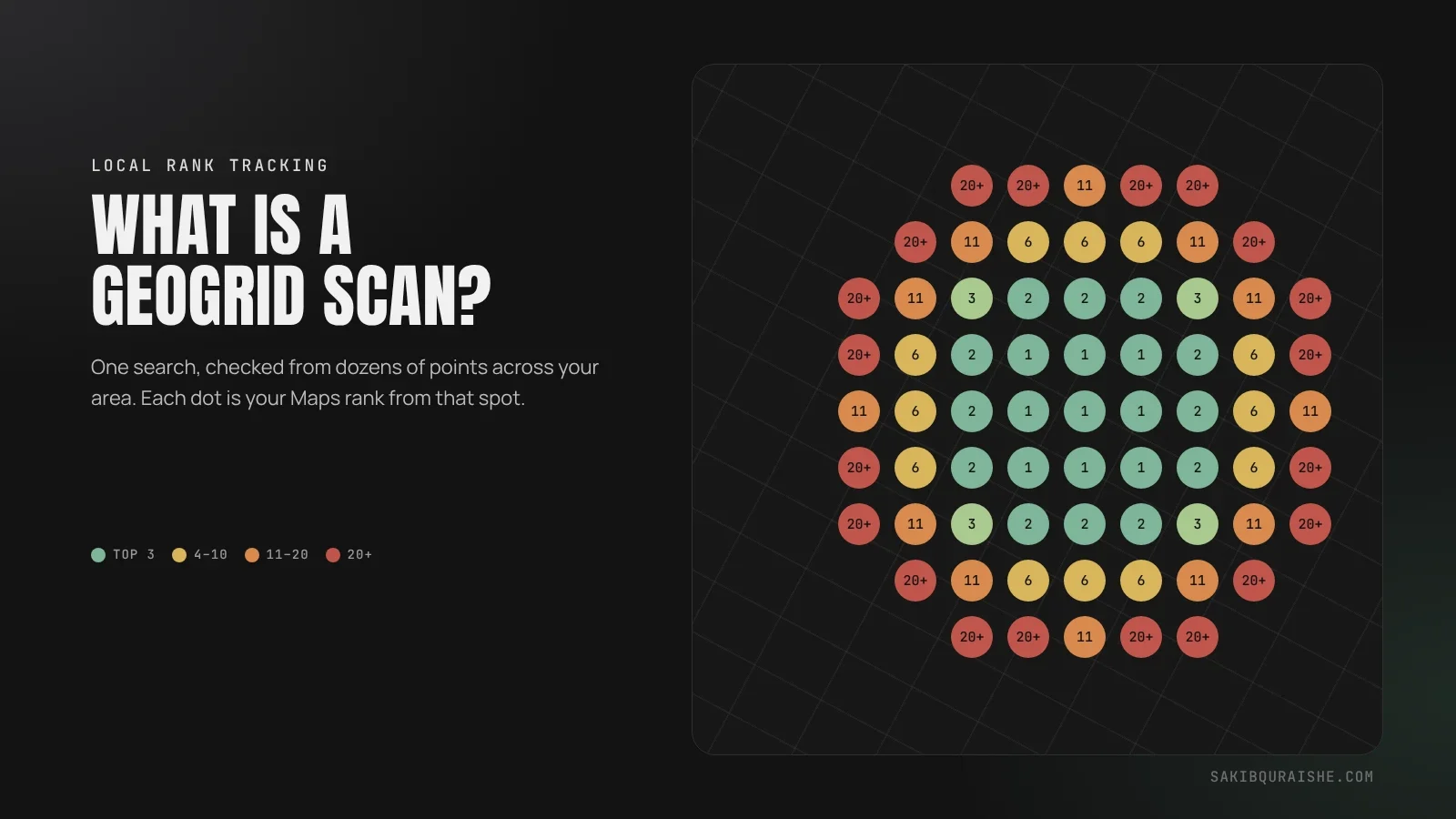
A GeoGrid scan checks where your business ranks on Google Maps from dozens of points across your service area, then shows the results as a colour-coded map. Green points mean you're in the top three there; red means customers in that spot barely see you. It's the most accurate way to measure local rankings, because your position changes depending on where the searcher is standing.
- A GeoGrid runs the same Google Maps search from many points and records your rank at each one.
- Read three things: where you're green, where you're missing, and how the picture changes between scans.
- Tools define metrics differently, so always check what "SoLV" or "average rank" means in yours.
- Compare scans only when the settings and time of day are identical.
- On my campaigns, GeoGrids are how I prove progress, such as an average map rank moving from 20.23 to 1.53.
I use GeoGrid scans on every local SEO campaign, from the first audit to the monthly report. They're also the clearest way to show a business owner why checking rankings from their own desk is misleading.
What is a GeoGrid scan?
A GeoGrid scan is a local rank check that runs the same Google Maps search from a grid of GPS points around your business, such as 7×7 (49 points) or 11×11 (121 points). At each point it records your position, as if a customer were standing there and searching. The result is a map of your visibility, not a single ranking number. Tools call it a geo-grid, local search grid, map rank tracker or heatmap.
GeoGrid scans measure local SEO results. New to the topic? See what is local SEO and how it works.
Why isn't one ranking check enough?
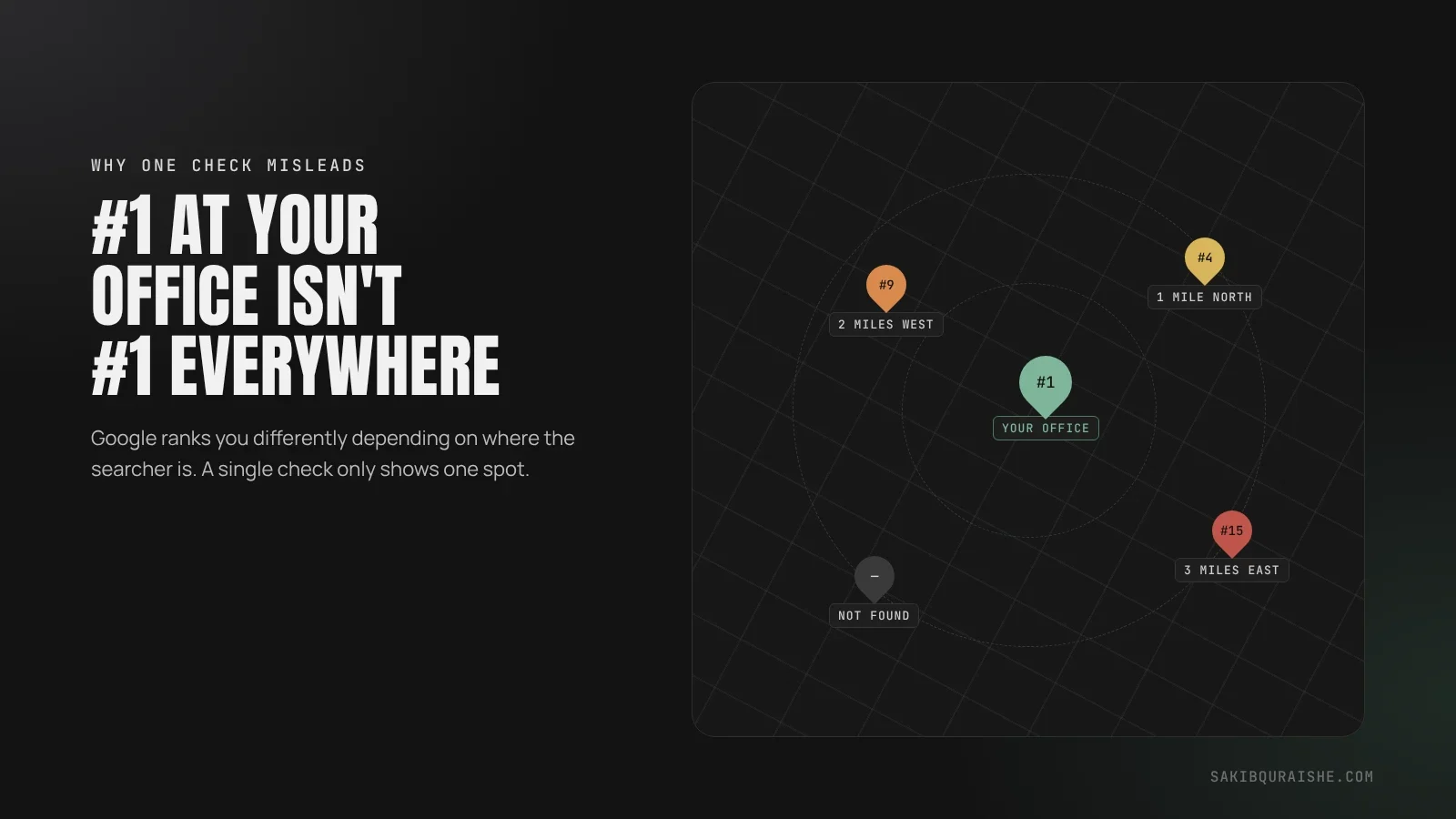
One ranking check isn't enough because Google ranks local businesses partly by distance from the searcher. Check from your office and you'll usually see yourself near the top; a customer three miles away might see you at #14 or not at all. A single number hides where you're winning and where you're invisible.
That gap explains a question many owners ask: "we rank #1, so why aren't the phones ringing?" More in why you rank at your office but not 2 miles away.
Results change by location because of how "near me" searches work.
How does a GeoGrid scan work?
A GeoGrid scan works by laying a grid of evenly spaced points over a map, centred on your business or target area, then searching one keyword from each point. Most tools read the organic map results only, skipping ads, and use a fixed map zoom so scans are comparable over time, as SerpDino explains. You choose:
- The keyword, such as "emergency plumber".
- The centre point, usually your address or the area you want to win.
- The grid size, such as 5×5, 7×7 or 11×11.
- The spacing between points, such as 0.5 miles or 2 km.
Each point is one search, so most tools charge one credit per point per keyword.
How do you read a GeoGrid scan?
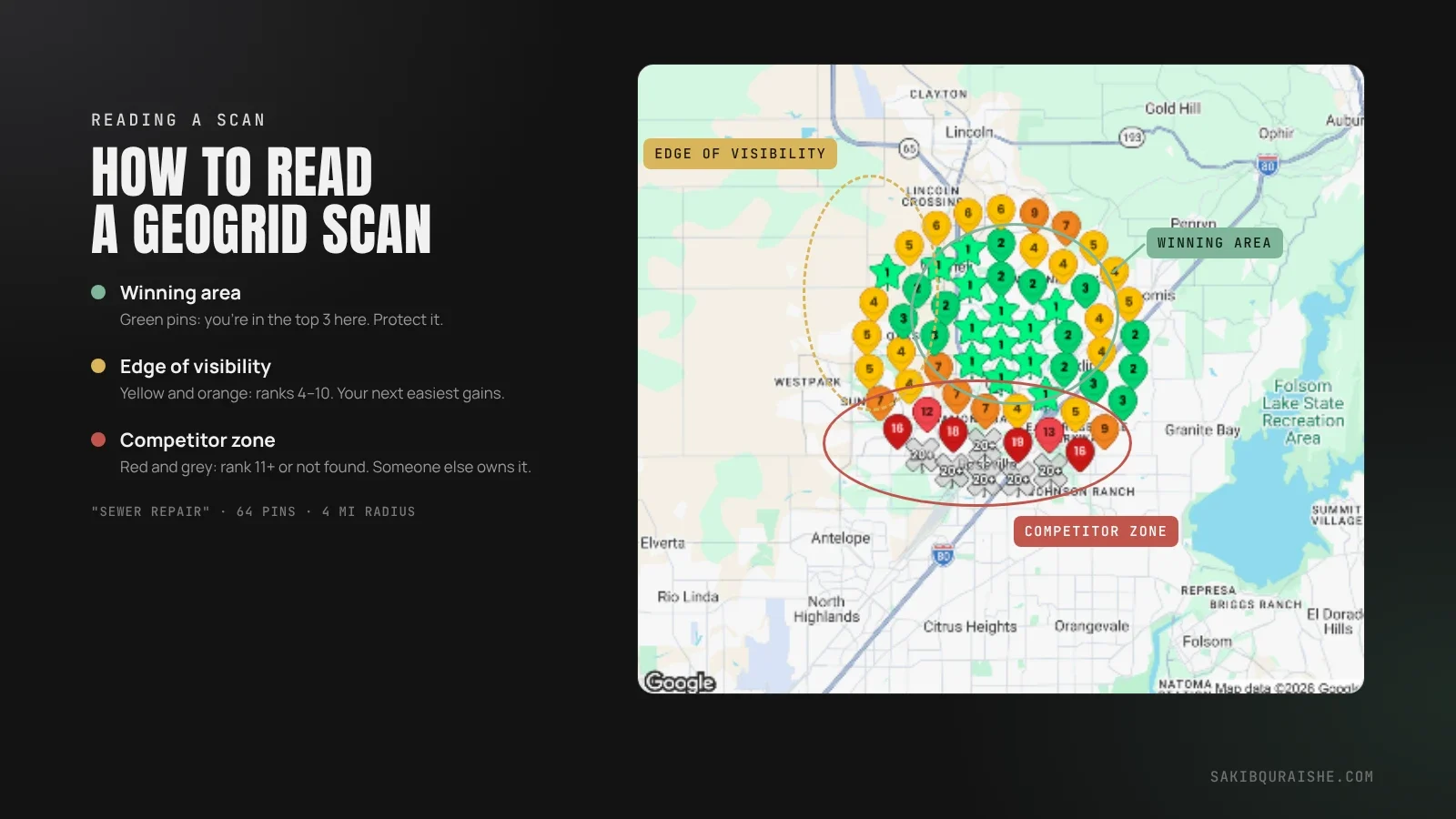
You read a GeoGrid scan by looking at the colours first, then the patterns. Most tools use similar colour bands:
| Colour | Typical meaning |
|---|---|
| Green | Positions 1–3: you're in the map pack here |
| Yellow | Positions 4–10: visible if people scroll |
| Orange | Positions 11–20: rarely seen |
| Red | Beyond 20 or not found: effectively invisible |
Then check three things:
- Where you're green. This is your real, winning area.
- Where you're red or missing. These are the customers you're losing, and often the biggest opportunity.
- Who beats you at each point. Click a red or yellow point to see which competitors rank above you there.
What do GeoGrid metrics mean?
GeoGrid metrics summarize the whole grid in one number, but tools define them differently. FullReviews' free checker, for example, defines Share of Local Voice as the share of points where you rank top 3, while SerpDino counts top 20. Always check your tool's definition before comparing numbers.
| Metric | What it usually means | Watch out for |
|---|---|---|
| Average rank (ARP) | Your average position at the points where you appear | Ignores points where you don't appear at all |
| Average total rank (ATRP) | Your average across every point, counting "not found" as a low position | Harsher, but more honest |
| Share of Local Voice (SoLV) | The share of points where you rank in the top 3 (or top 20, depending on the tool) | Definition varies by tool |
| Top-of-map coverage | The share of points where you're in the top 3 | The clearest business metric |
| Out-of-map area | The share of points where you don't appear at all | Often the biggest hidden problem |
I report average map rank, top-of-map coverage and out-of-map area together, because each shows something the others hide.
What do common GeoGrid patterns tell you?
Common GeoGrid patterns tell you what's holding you back. Here's how I read them:
| Pattern | Likely cause | What to do |
|---|---|---|
| Green centre, red edges | Distance; not enough relevance and prominence to reach further | Build reviews, links and service pages; target longer-tail keywords |
| Red almost everywhere | Wrong primary category, weak profile, or a suspension or filter | Fix categories and services first; check the profile's status |
| Green on one side only | Competitors are stronger on the other side, or your signals favour one area | Check who wins the red side and what they have that you don't |
| Red pocket inside a green area | A strong competitor based right there | Compare your profile with theirs; look for spam to report |
| Green in a far town | Reviews, jobs or a page tied to that town | Repeat what worked there in other target towns |
For the first two patterns, start with how to choose your Google Business Profile categories.
How should you set up a GeoGrid scan?
You should set up a GeoGrid scan to match the area your customers actually come from. Some starting points:
| Business type | Grid size | Spacing | Roughly covers |
|---|---|---|---|
| City storefront (cafe, clinic) | 7×7 | 0.5 mile | About 3 × 3 miles |
| Suburban storefront or small SAB | 9×9 | 1 mile | About 8 × 8 miles |
| Service-area business across a metro | 11×11 | 1–2 miles | About 10–20 miles across |
| Rural or wide-area SAB | 11×11 or larger | 2–5 miles | A county or more |
Four rules for fair, comparable scans:
- Use the keywords customers actually search, such as "roof repair" rather than your brand name.
- Keep the same centre, grid size, spacing and keywords every time.
- Run scans at the same time of day, during opening hours. Being open at the time of search ranked #5 in the Whitespark 2026 Local Search Ranking Factors, so a scan run after closing time can make you look worse than you are.
- Remove points over water or empty land if your tool allows it.
How often should you run a GeoGrid scan?
You should run a GeoGrid scan once before you change anything, then monthly on the same settings. Add an extra scan after a big change, such as a new primary category, a review push, a suspension or a Google update. Weekly scans often show normal ups and downs that mean nothing; monthly shows the real trend.
Scans fit into a wider plan. See how to build a 90-day local SEO strategy.
What does a real before-and-after scan look like?
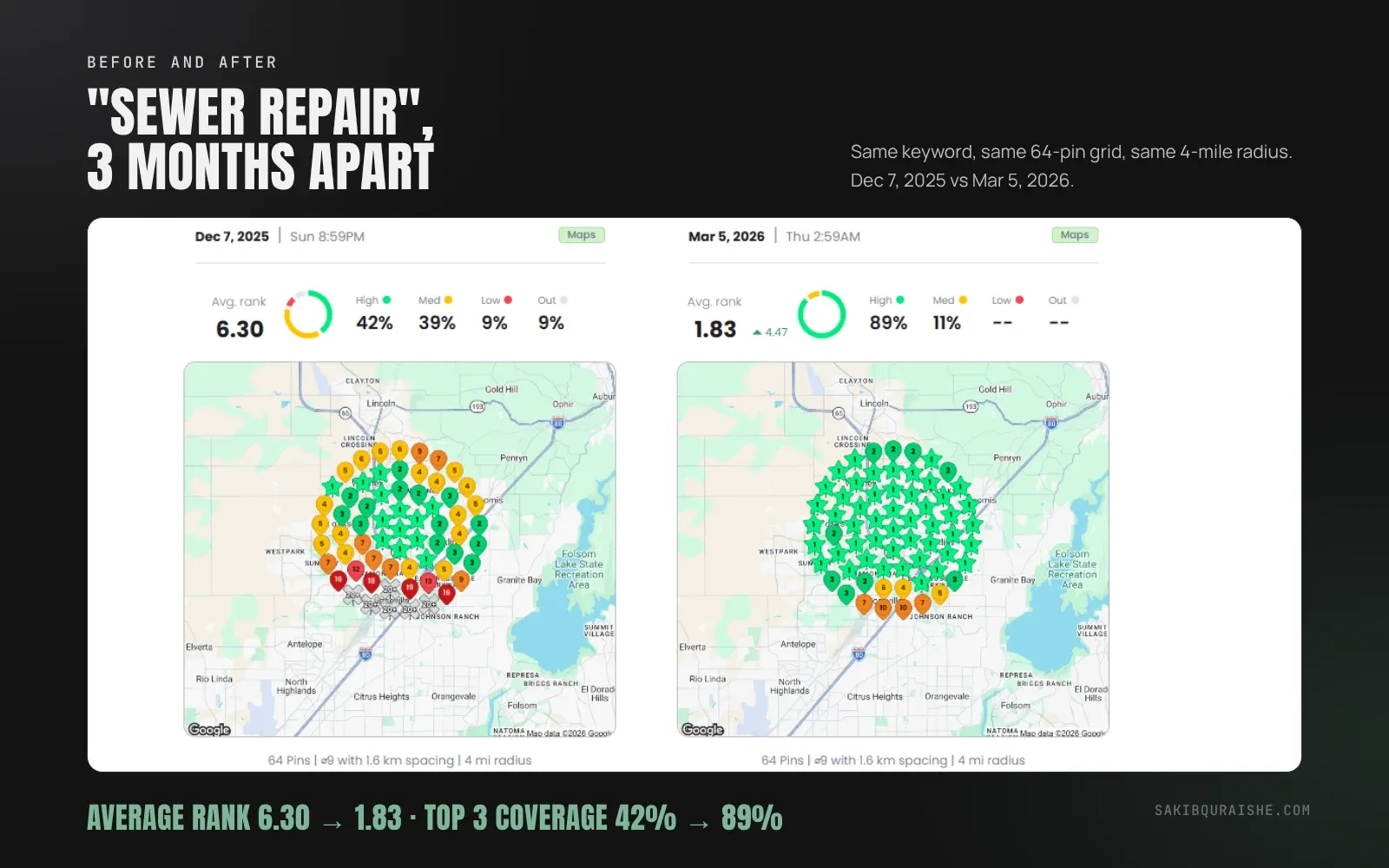
A real before-and-after scan shows the green spreading outward month by month. From two of my campaigns:
- Cash home buyer, Oak Creek, WI: average map rank on the main search moved from 20.23 to 1.53 in four months, and the area where the business didn't appear at all dropped from 90% to 0%. Read the case study.
- Roofer, Scottsdale, AZ: top-of-map coverage went from 0% to 49% in four months. Read the case study.
How long changes take to show up is covered in how long it takes to rank in the Google Maps 3-Pack.
What can't a GeoGrid scan tell you?
A GeoGrid scan can't tell you everything, so pair it with other data:
- It covers one keyword at a time. Rank on "plumber" says nothing about "water heater repair".
- It's a snapshot. Results shift with time of day, competitor changes and updates.
- It doesn't show calls or leads. Check your Google Business Profile Performance report for those.
- It doesn't show AI answers. Visibility in ChatGPT or Google's AI Overviews needs separate checks.
- It can't prove the cause. A pattern suggests a reason; your audit confirms it.
Rankings aren't revenue. See how to calculate the ROI of local SEO.
Which GeoGrid tool should you use?
The GeoGrid tool you should use depends on budget and how many keywords and locations you track. Local Falcon, BrightLocal, Whitespark, Local Viking, Semrush and others all offer grid tracking, and BrightLocal's geo-grid tool comparison lists starting prices from about $10 to $40 a month. For a one-off check, free tools such as FullReviews' checker run a single 7×7 scan. Pick one tool and stick with it, since different tools measure slightly differently.
FAQ
What is a good GeoGrid score?
A good GeoGrid score is one that improves month over month for your main keywords. As a rough guide, green across most of the area you serve means you're competitive; compare against your top competitors rather than a fixed number.
Why do different GeoGrid tools show different results?
Different GeoGrid tools show different results because they use different zoom levels, colour bands, metric definitions and scan times.
Do GeoGrid scans work for service-area businesses?
GeoGrid scans work well for service-area businesses, because they show how far from your hidden verified address you actually rank. See service-area business vs storefront businesses in local SEO.
Why does my own search show a different rank?
Your own search shows a different rank because you're searching from one spot, often near your business, and Google may personalize results for you.
Is there a free GeoGrid tool?
There are free GeoGrid tools for occasional checks, such as FullReviews' 7×7 checker. Regular tracking usually needs a paid tool.
Want a GeoGrid scan of your area?
I'll run a GeoGrid scan for your main keywords, show you where you're winning and losing, and explain what's causing it. Request a free local map audit, or see how GeoGrid tracking fits into my Local SEO service. Agencies can get GeoGrid reports in their own branding through my white label local SEO. For the full profile checklist, read my Google Business Profile checklist.
Monthly map scans with a plain-English report are included in my Google Business Profile optimization service.
Sources
- BrightLocal: Geo-grid ranking tool comparison
- SerpDino: Local rank tracker
- FullReviews: GeoGrid local rank checker
- Whitespark: 2026 Local Search Ranking Factors
- Your case studies: cash home buyer, roofing
- Also read: Local Dominator, Memin, Adatek, Slashpost, MyAds Guru.