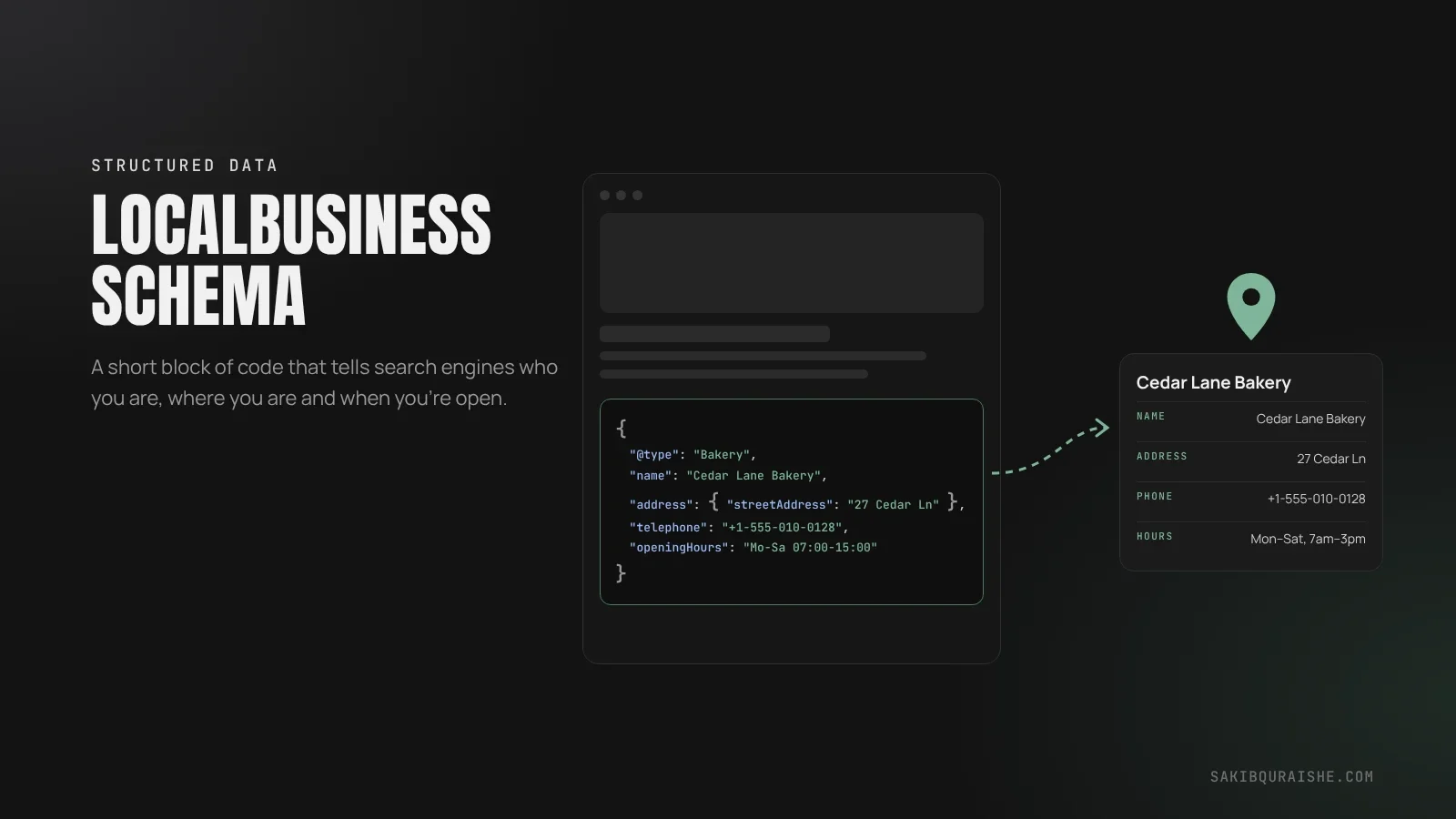
LocalBusiness schema is a short block of code that describes your business to search engines: name, address, phone, hours and location. You add it to your website as JSON-LD, then test it with Google's Rich Results Test. It helps Google understand and trust your business details. It doesn't directly push you up the map pack.
- Google only requires two properties: name and address. Add phone, hours, URL, geo and more for a complete picture.
- Use the most specific type that's true (Plumber, Dentist), not just LocalBusiness.
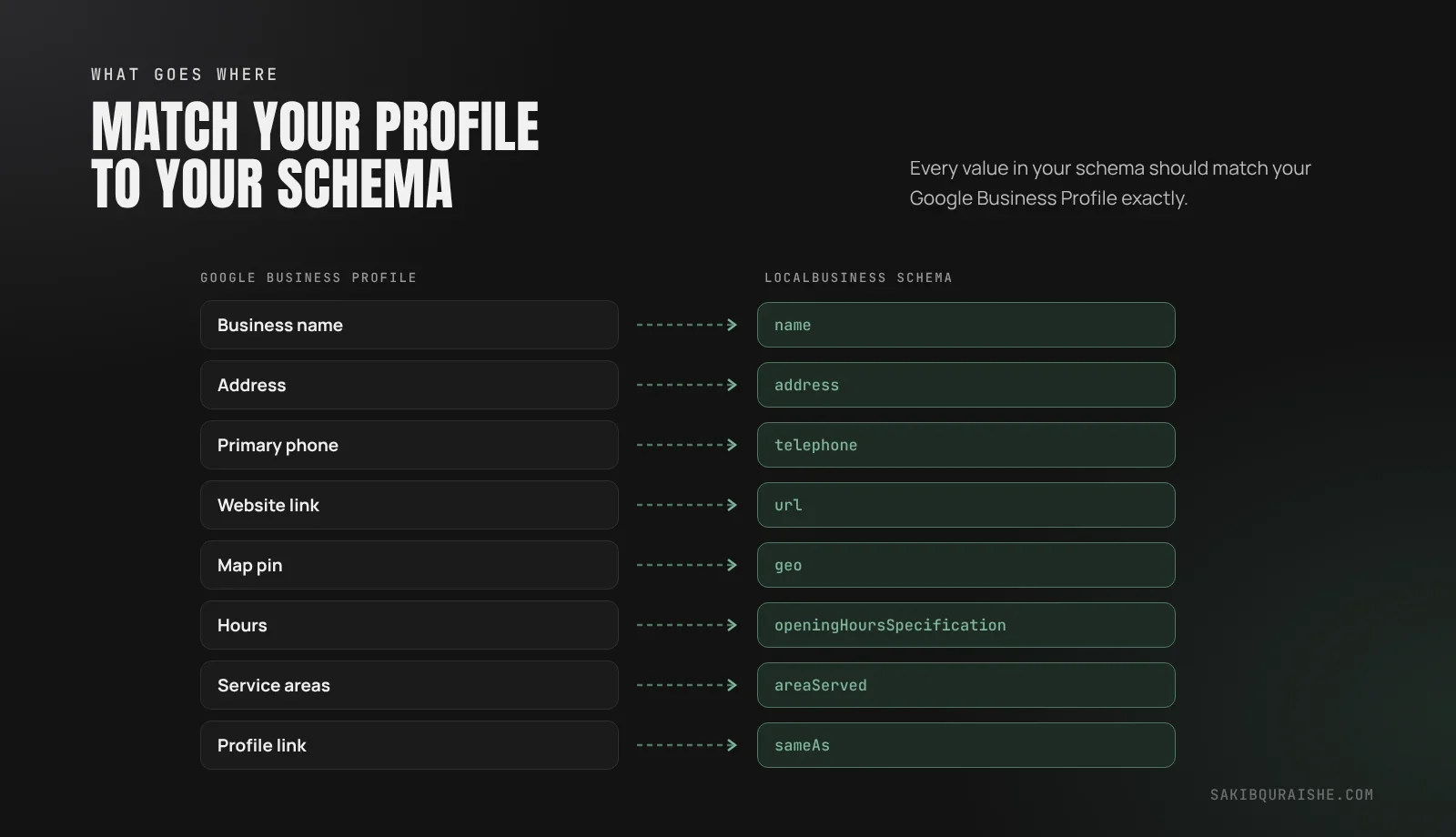
- Every detail must match your Google Business Profile and what's visible on the page.
- You can't get review stars by marking up reviews of your own business.
- Test with the Rich Results Test and the Schema Markup Validator. Use one source of schema, not two.
Schema is one of the most over-promised parts of local SEO. Some guides say it boosts rankings; Google's own documentation never says that. This guide shows what it actually does, with three templates you can copy.
What is LocalBusiness schema?
LocalBusiness schema is a type of structured data from Schema.org, the shared vocabulary that Google, Bing and other search engines use. It's a subtype of both Organization and Place, made for businesses with a physical location or a local service area. You write it in JSON-LD, a short script block that sits in your page's code and isn't visible to visitors.
It tells search engines facts like:
- what your business is called and what type of business it is;
- where you are, or which areas you serve;
- how to contact you;
- when you're open;
- which other profiles belong to you (Google Business Profile, Facebook, Yelp).
More local SEO terms explained in the local SEO glossary.
Does LocalBusiness schema help local rankings?
LocalBusiness schema doesn't directly help local rankings. Google's local ranking help page says results are based mainly on relevance, distance and prominence, and schema isn't listed. Google's LocalBusiness documentation says the markup can help with the knowledge panel shown for a business, and that Google "does not guarantee that features that consume structured data will show up in search results."
What schema does do:
- Confirms your details. It's one more place where your name, address and phone are stated clearly, alongside your Business Profile and citations. See NAP consistency.
- Connects your profiles. sameAs links your website to your Business Profile and social pages, so search engines can tell they're the same business.
- Helps machines read your page. That includes search engines and AI systems (more on that below).
So add it, because it's quick and low-risk. Just don't expect it to fix weak rankings. Your Business Profile, reviews and website content do the heavy lifting. See the Google Business Profile optimization guide.
For what does drive local rankings, see what is local SEO and how it works.
Which LocalBusiness type should you use?
You should use the most specific type that's true for your business. Schema.org's LocalBusiness page lists dozens of more specific types, grouped into categories. Some common ones:
| Business | Schema type |
|---|---|
| Roofer | RoofingContractor |
| Plumber | Plumber |
| Electrician | Electrician |
| Dentist | Dentist |
| Medical clinic | MedicalClinic |
| Lawyer | LegalService (or Attorney) |
| Real estate agent | RealEstateAgent |
| Restaurant | Restaurant |
| Hair salon | HairSalon |
| Car repair | AutoRepair |
If you do two things (a plumber that also does heating), Google's documentation says to list both types as an array: "@type": ["Plumber", "HVACBusiness"]. If nothing fits, use LocalBusiness. Your schema type is separate from your Business Profile category, but they should describe the same business. See GBP categories.
What properties does LocalBusiness schema need?
LocalBusiness schema needs only two properties to be valid for Google: name and address. Google's LocalBusiness documentation recommends several more. Here's what each one is, and the Business Profile field it should match:
| Property | What it is | Match it to | Google's rule |
|---|---|---|---|
| name (required) | Business name | GBP business name | Your real name, no extra keywords |
| address (required) | Street, city, region, postcode, country | GBP address | Include as many parts as you can |
| telephone | Main phone | GBP primary phone | Include country and area code |
| url | The page for this location | GBP website link | Must be a working link to the specific location |
| geo | Latitude and longitude | Your map pin | At least 5 decimal places |
| openingHoursSpecification | Opening hours | GBP hours | See the hours section below |
| priceRange | e.g. $$ or 300 | , | Under 100 characters |
| image | Photo of the business | Your own photos | A real image URL, not just your homepage |
| sameAs | Your other profiles | GBP, Facebook, Yelp, LinkedIn | URLs of profiles that are definitely yours |
| areaServed | Cities or regions you serve | GBP service areas | Useful for service-area businesses |
| @id | A unique ID for this business | , | Use your URL plus a label, e.g. https://example.com/#business |
Tip: @id isn't a web page. It's a label that lets other schema on your site point to the same business. Many examples, including Google's own AI answer for this topic, copy the homepage URL into @id, which works but makes it easy to mix up the business with the page.
LocalBusiness schema example for a storefront
This LocalBusiness schema example is for a business customers visit, like a dental office. Replace every value with your real details:
<script type="application/ld+json">
{
"@context": "https://schema.org",
"@type": "Dentist",
"@id": "https://example.com/#business",
"name": "Example Family Dental",
"url": "https://example.com/",
"telephone": "+1-555-555-0123",
"image": "https://example.com/images/clinic-front.jpg",
"priceRange": "$$",
"address": {
"@type": "PostalAddress",
"streetAddress": "123 Main Street, Suite 200",
"addressLocality": "Columbia",
"addressRegion": "PA",
"postalCode": "17512",
"addressCountry": "US"
},
"geo": {
"@type": "GeoCoordinates",
"latitude": 40.03371,
"longitude": -76.50437
},
"openingHoursSpecification": [
{
"@type": "OpeningHoursSpecification",
"dayOfWeek": ["Monday", "Tuesday", "Wednesday", "Thursday", "Friday"],
"opens": "08:00",
"closes": "17:00"
}
],
"sameAs": [
"https://maps.google.com/?cid=YOUR_CID",
"https://www.facebook.com/examplefamilydental"
]
}
</script>
To find your Business Profile link for sameAs, open your profile on Google Maps, click Share and copy the link.
LocalBusiness schema example for a service-area business
This LocalBusiness schema example is for a business that travels to customers and hides its address on Google, like a roofer. The difference is areaServed, and a city-level address instead of a street address:
<script type="application/ld+json">
{
"@context": "https://schema.org",
"@type": "RoofingContractor",
"@id": "https://example.com/#business",
"name": "Example Roofing Co.",
"url": "https://example.com/",
"telephone": "+1-555-555-0199",
"image": "https://example.com/images/crew-truck.jpg",
"address": {
"@type": "PostalAddress",
"addressLocality": "Scottsdale",
"addressRegion": "AZ",
"postalCode": "85251",
"addressCountry": "US"
},
"areaServed": [
{ "@type": "City", "name": "Scottsdale" },
{ "@type": "City", "name": "Tempe" },
{ "@type": "City", "name": "Mesa" }
],
"openingHoursSpecification": [
{
"@type": "OpeningHoursSpecification",
"dayOfWeek": ["Monday", "Tuesday", "Wednesday", "Thursday", "Friday", "Saturday"],
"opens": "07:00",
"closes": "18:00"
}
],
"sameAs": ["https://maps.google.com/?cid=YOUR_CID"]
}
</script>
If you hide your street address on your Business Profile, don't publish it in your schema or on your website either. Keep the address at city level so everything stays consistent. Leave out geo too, since exact coordinates would reveal the address. List the same areas in areaServed that you list on your profile. See service-area business vs storefront.
How do you add schema for multiple locations?
You add schema for multiple locations by giving each location its own page and its own LocalBusiness block, with that location's address, phone, hours and map link. Then connect them to the main brand:
- Homepage: one Organization block for the brand, with @id like https://example.com/#organization, plus your logo and social profiles.
- Each location page: one LocalBusiness block with its own @id (e.g. https://example.com/locations/tempe/#business), its own url, and "parentOrganization": { "@id": "https://example.com/#organization" }.
- Don't put every location's schema on the homepage or in the footer of every page.
If a store has departments with their own hours or phone, like a pharmacy inside a supermarket, Google's documentation says to nest them with department, named "{store name} {department name}" (for example, "gMart Pharmacy").
City pages for areas you serve but aren't located in shouldn't get their own LocalBusiness block with a fake address. See how to rank in multiple cities without thin location pages, and my National & Enterprise SEO service for multi-location brands.
How do you mark up opening hours correctly?
You mark up opening hours with openingHoursSpecification, one entry per set of days with the same hours. Google's documentation covers these special cases:
| Situation | How to write it |
|---|---|
| Normal hours | "opens": "09:00", "closes": "17:00" |
| Open 24 hours | "opens": "00:00", "closes": "23:59" |
| Closed all day | "opens": "00:00", "closes": "00:00" |
| Open past midnight | One entry, e.g. Saturday "opens": "18:00", "closes": "03:00" |
| Seasonal or holiday closure | Add "validFrom" and "validThrough" dates (YYYY-MM-DD) |
Your hours should match your Business Profile hours exactly. When you add holiday hours on your profile, update the schema too, or remove the date-limited entry once it passes.
Can you add review stars with LocalBusiness schema?
You can't add review stars by marking up reviews of your own business. Google's review snippet guidelines say that if a business controls the reviews about itself, its pages using LocalBusiness or Organization markup are "ineligible for star review feature." That includes reviews pasted onto your site and reviews shown through a widget.
Google only recommends review and aggregateRating in LocalBusiness markup for sites that collect reviews about other businesses, like a directory. Your stars on Google come from your Business Profile reviews. See how to get more Google reviews.
How do you add LocalBusiness schema to your website?
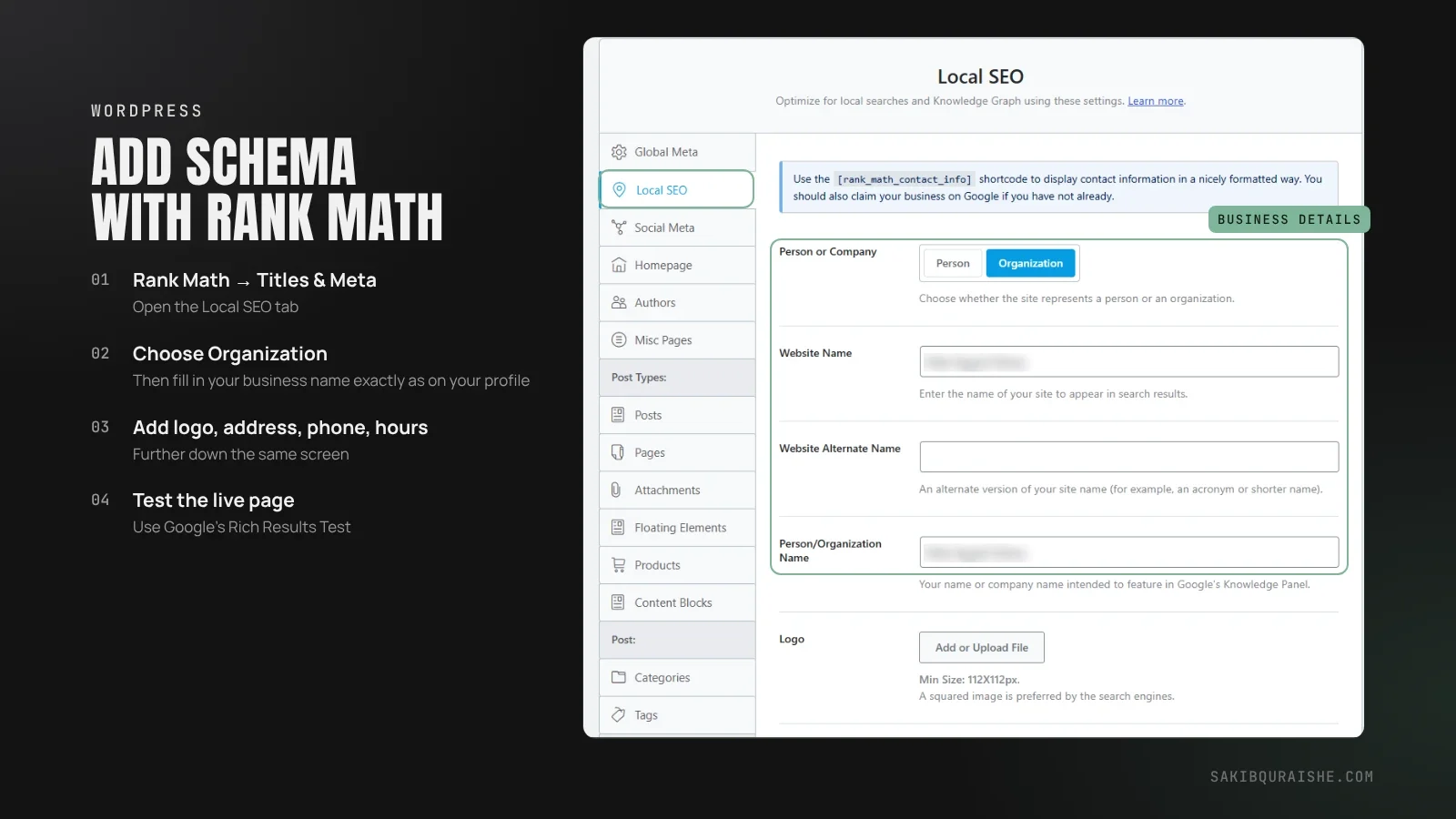
You add LocalBusiness schema to your website by pasting the JSON-LD into the page's code, or by filling in an SEO plugin. Pick one method:
| Platform | How |
|---|---|
| WordPress + Rank Math | Titles & Meta → Local SEO: fill in your business details |
| WordPress + Yoast | The Yoast Local SEO add-on (paid) adds LocalBusiness markup |
| WordPress (manual) | Paste the script with a header code snippet plugin, on the relevant page only |
| Wix / Squarespace / Webflow | Custom code or page header code settings |
| Google Tag Manager | Custom HTML tag on the right page. Google can read JSON-LD added with JavaScript, but direct in the HTML is more reliable |
After adding it, check that you don't have two LocalBusiness blocks on the same page, for example one from your theme and one from a plugin. Two versions with different details make Google guess.
How do you test LocalBusiness schema?
You test LocalBusiness schema with two free tools:
- Google's Rich Results Test: enter your live page URL. It shows whether Google can read your LocalBusiness markup and lists errors and warnings.
- Schema Markup Validator: checks your markup against Schema.org's full vocabulary, including properties Google doesn't use.
Test the live URL, not just the pasted code, so you catch problems from plugins and caching. Retest after theme changes, plugin updates or a move.
What are the most common LocalBusiness schema mistakes?
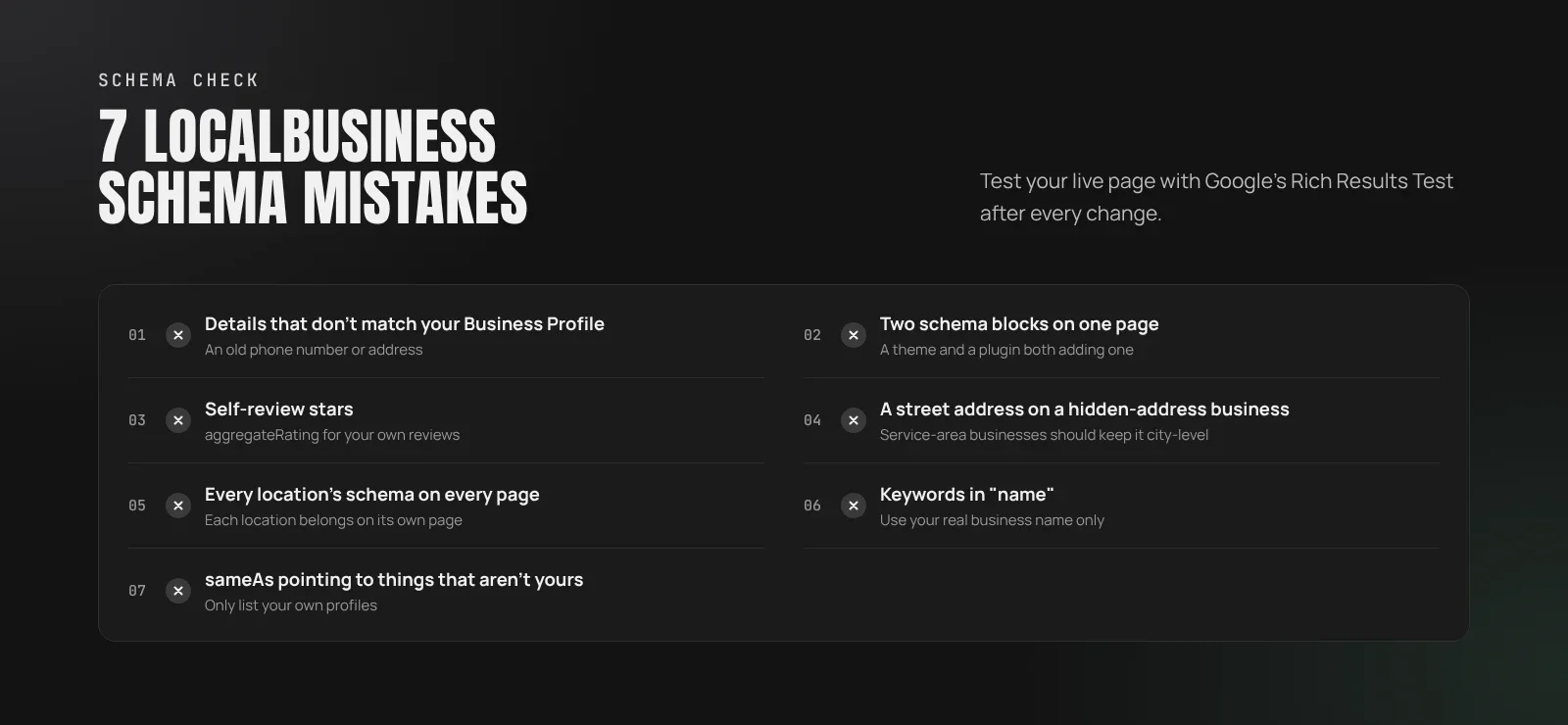
The most common LocalBusiness schema mistakes are small mismatches and leftovers. Check for these:
- Details that don't match your Business Profile, such as an old phone number or address.
- Two schema blocks from a theme and a plugin, with different details.
- Self-review stars marked up with aggregateRating.
- A street address in the schema of a service-area business that hides its address.
- Every location's schema on every page instead of on each location's own page.
- Keywords in name that aren't part of your real business name. See keywords in your business name.
- Using sameAs for things that aren't your profiles, like a Wikipedia page about your industry.
Does LocalBusiness schema help with AI search?
LocalBusiness schema may help AI search tools understand your business, but nobody has shown it directly gets you cited. Microsoft's Fabrice Canel said at SMX Munich in March 2025 that Bing uses schema markup to help its large language models understand content, as reported by Search Engine Land. Google hasn't said the same for AI Overviews or AI Mode.
The safe view: schema makes your business facts clear and consistent in one more place, which is what AI tools need when they compare sources. Pair it with strong content and consistent listings. See schema for AI search and my AI Search Optimization service.
FAQ
Is LocalBusiness schema required for local SEO?
LocalBusiness schema isn't required for local SEO. Many businesses rank without it. It's a quick, low-risk way to state your details clearly.
Should every page have LocalBusiness schema?
Every page doesn't need LocalBusiness schema. Put it on your homepage (single location) or on each location's page (multiple locations).
What's the difference between Organization and LocalBusiness schema?
The difference between Organization and LocalBusiness schema is location. Use Organization for the brand as a whole and LocalBusiness for a place customers visit or a local service area.
Can I use ChatGPT to write LocalBusiness schema?
You can use ChatGPT to write LocalBusiness schema, but check every value against your Business Profile and test it, because AI tools can invent properties or details.
How long does schema take to show up?
Schema is read when Google next crawls the page. You can request indexing in Search Console's URL Inspection tool to speed it up.
Want your schema and Business Profile checked?
Schema is one small part of how Google reads your business. If you want to know what's actually holding your rankings back, request a free local map audit, or see my Local SEO service.
Sources
- Google: LocalBusiness structured data: required/recommended properties, geo 5 decimals, priceRange under 100 characters, hours examples, departments, multiple types as an array, "does not guarantee"
- Google: Review snippet guidelines: self-controlled reviews "ineligible for star review feature"
- Schema.org: LocalBusiness: parent types, subtypes, valid properties (areaServed, sameAs, parentOrganization, department)
- Google: How local results are ranked: relevance, distance, prominence
- Search Engine Land: Microsoft Bing/Copilot use schema for its LLMs: Fabrice Canel, SMX Munich, March 2025
- PPC Land: Google ends FAQ rich results, quoting Google: "As of May 7, 2026, FAQ rich results are no longer appearing in Google Search."
- Rich Results Test and Schema Markup Validator